.svg)
Traditional integration platforms were built to connect systems — not to keep operations visible, compliant, and fast while those systems keep changing. That distinction is driving more operations leaders to look past the established players.
An iPaaS alternative built around day-to-day operations, rather than system architecture, closes that gap directly.
The no-code integration platform allows operational teams to develop and modify their workflows on their own, independent of the developer backlog. The workflow automation platform executing on live triggers shifts from the batch scheduling mentality of the older middleware platforms, and the SaaS integration hub that makes compliance and monitoring integral to its operations, gives executives the same visibility they expect everywhere else.
This article looks at where traditional iPaaS falls short for operational teams, and what changes in practice when an alternative approach is used instead.
The Integration Drag Holding Operations Back in 2026
It’s not that operations teams lack technology — it’s that none of it arrived at the same time. There’s a CMMS for work orders, an ERP for billing, a CRM for client renewals, and now a growing layer of IoT and SCADA sensors stacked on top.
Downtime is where this cost becomes visible to leadership. Every hour of system downtime adds directly to operational losses, and poor integration is frequently the root cause behind it.
Manual re-entry errors ripple into billing, asset records, and client-facing reports. Audit gaps appear whenever data moves between systems with no consistent trail. And underneath it all sits a widening integration backlog — demand from operations teams simply outpaces what IT budgets and project timelines can keep up with.
It becomes a mismatch between how operational data needs to move and how legacy middleware was designed to move it.
Where Traditional iPaaS Platforms Fall Short for Operational Teams
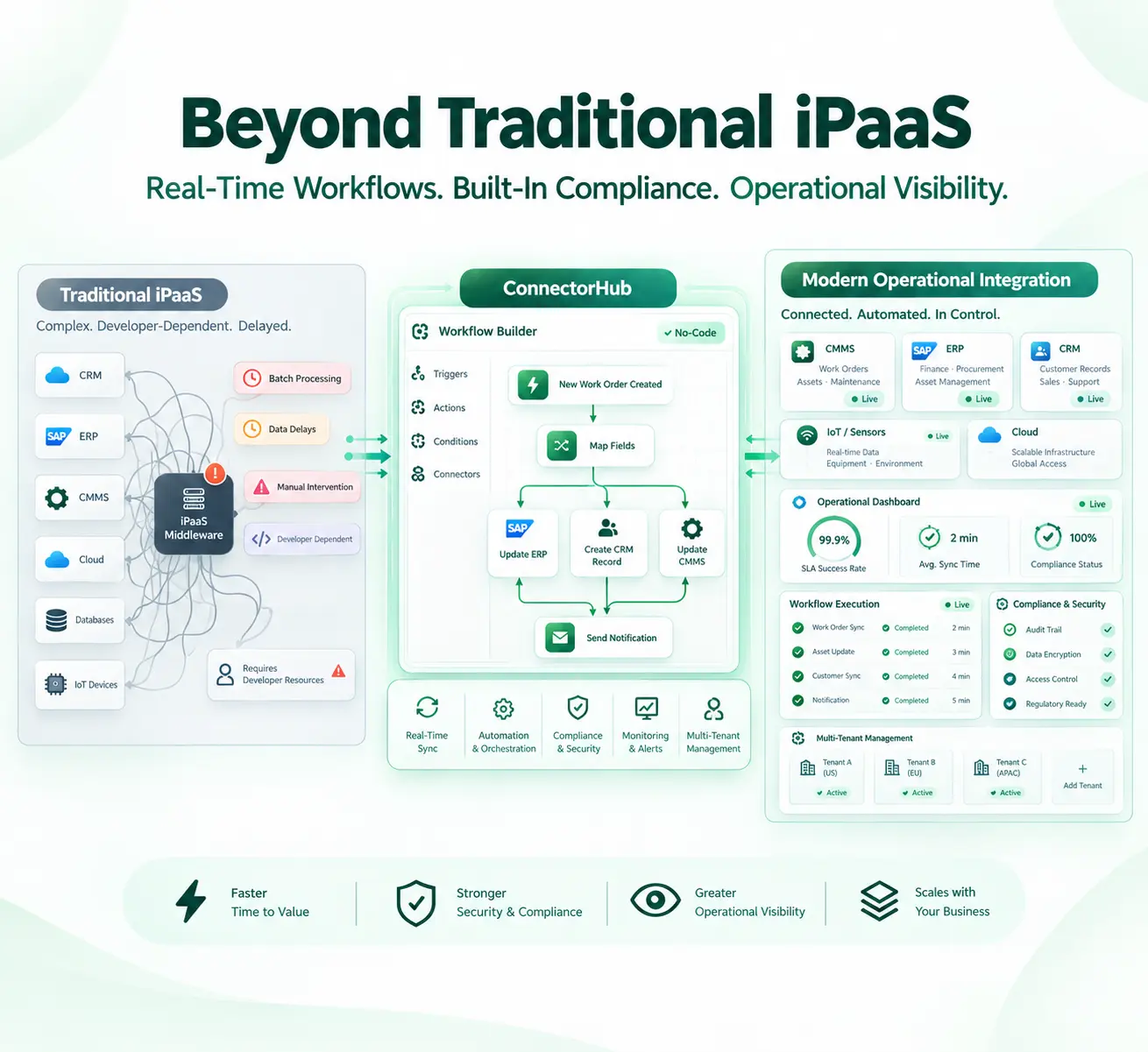
The traditional iPaaS products have been created for a different buyer such as IT architects who run API-led initiatives in big and slow organizations. It influences their behavior in many ways.
- Created for developers, not for operators. Changes to workflow often go through IT and turn a two-hour fix into a two-week ticket.
- Compliance as an afterthought. HIPAA, GDPR, and SOC 2 compliance is usually done via a different module or manual audit preparation, not integrated into each and every process.
- Monitoring to “it worked.” Most systems track that the job ran; few track if it ran successfully or if there was a failure without detection until the client noticed.
This gap is exactly where purpose-built operational alternatives have found room to grow.
What Difference Does Real-Time Workflow Orchestration Bring into the Table
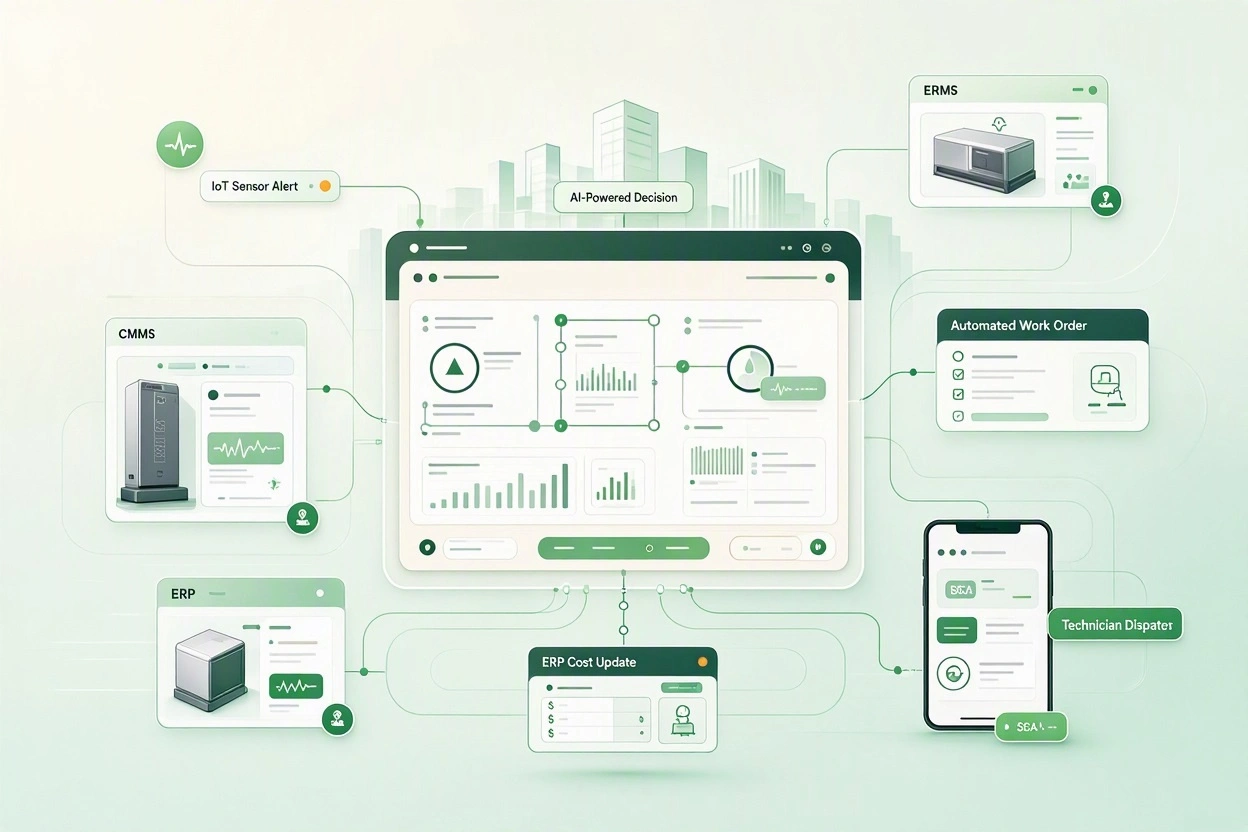
Operational data loses value the moment it sits in a queue. A work order created in a CMMS needs to reach dispatch, billing, and the client-facing ticket at close to the same moment it’s logged.
Real-time orchestration is based on certain practical processes. Event-driven triggers and webhooks launch the process right when there is an alteration in the record, not after a time-based check-in, and real-time data synchronization in CMMS, ERP, and CRM systems ensures that the change in one system will reflect elsewhere instantly.
Idempotent processing prevents the same work order or invoice from being created twice when a retry follows a network hiccup, while queue-based buffering absorbs traffic spikes without dropping records.
This is where integration automation earns its keep: it isn’t just connecting two apps, it’s making sure an automated business process behaves correctly under load, under partial failure, and under audit.
Teams moving from batch to real-time orchestration typically see the gap close between when something happens on-site and when it’s reflected in the system someone is actually looking at.
Built-In Compliance That Matches Regulated Operational Environments
Healthcare facilities, PropTech operators, and oil and gas sites share one trait — the data moving between their systems is regulated, sensitive, or both. Treating compliance as a project bolted on after deployment is an expensive way to find that out.
The numbers make the case plainly: a recent industry analysis puts the average healthcare breach at $7.42 million.
An operational data integration platform built for regulated environments should carry these protections as standard. That starts with enterprise-grade data security — encryption in transit and at rest, and credentials stored in an isolated, encrypted vault — paired with audit logging that captures every workflow run, change, and login, not only failures.
Role-based access control with clean tenant isolation keeps a partner or client from ever seeing another customer’s data, and alignment with HIPAA, GDPR, and SOC 2 requirements is built into the workflow layer itself, rather than handled through a separate compliance project.
SLA Monitoring and Operational Visibility Beyond Basic Logging
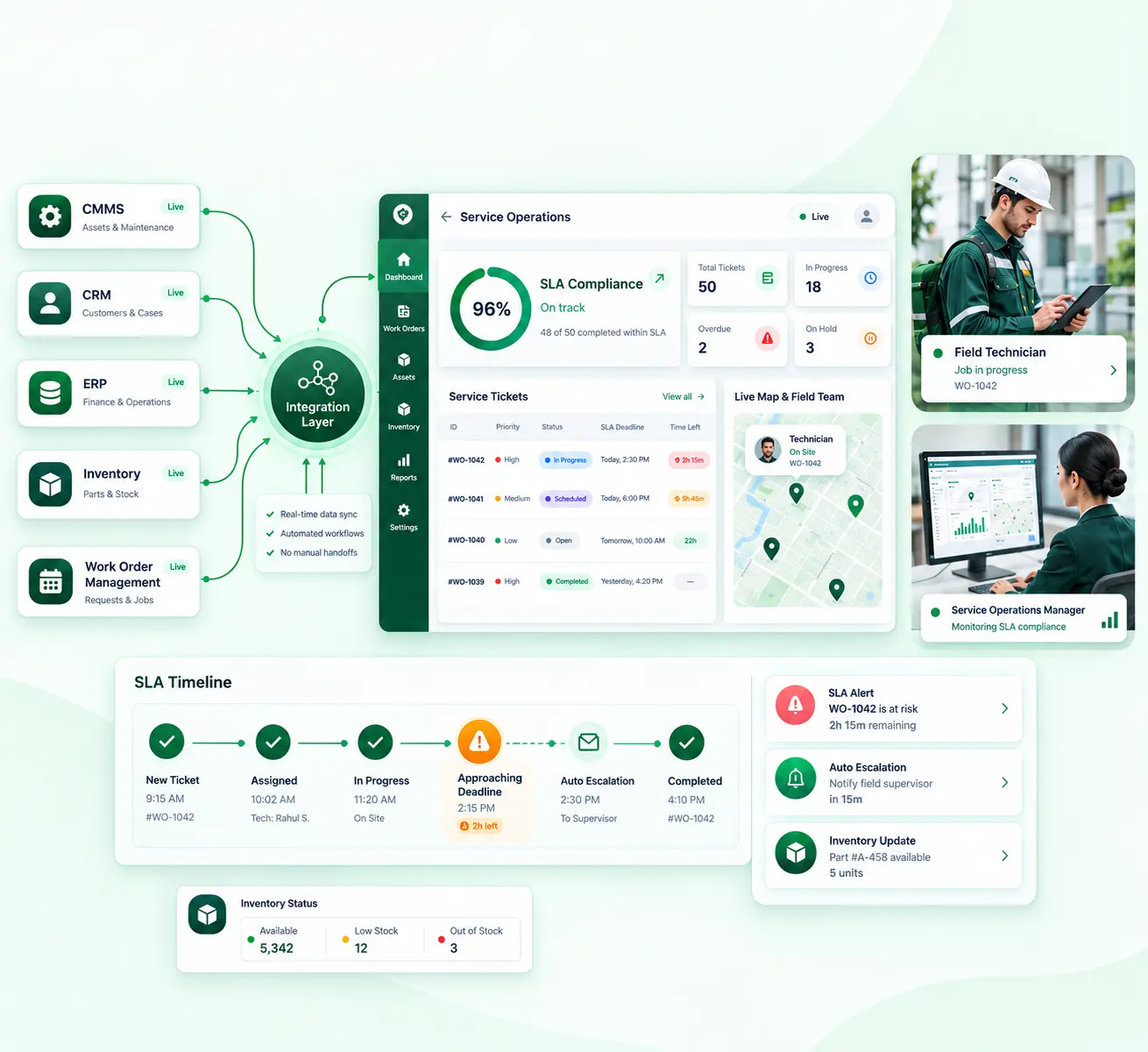
A workflow that “ran successfully” isn’t the same as a workflow that met its service level. Real operational visibility goes beyond simple logging, and it tends to show up through a few distinct traits.
Run-level detail is what actually makes troubleshooting possible — trigger source, records processed, a clear step-by-step breakdown of what happened. Instead of escalating a problem and waiting for someone else to dig in, a team can just look at the run and see exactly where it broke.
Costs related to downtime and SLA breaches escalate depending on how long they remain undetected. It becomes more costly with each passing hour. This is why it is important to have a monitoring layer which detects a process becoming degraded before it becomes an outage.
No-Code Scalability Designed for Mid-Market and Facility Teams
Mid-market operators and facility teams rarely have a bench of integration engineers on standby. With the right platform, they don’t need one — and that shift in who actually builds workflows has reshaped how operations teams get things done day to day.
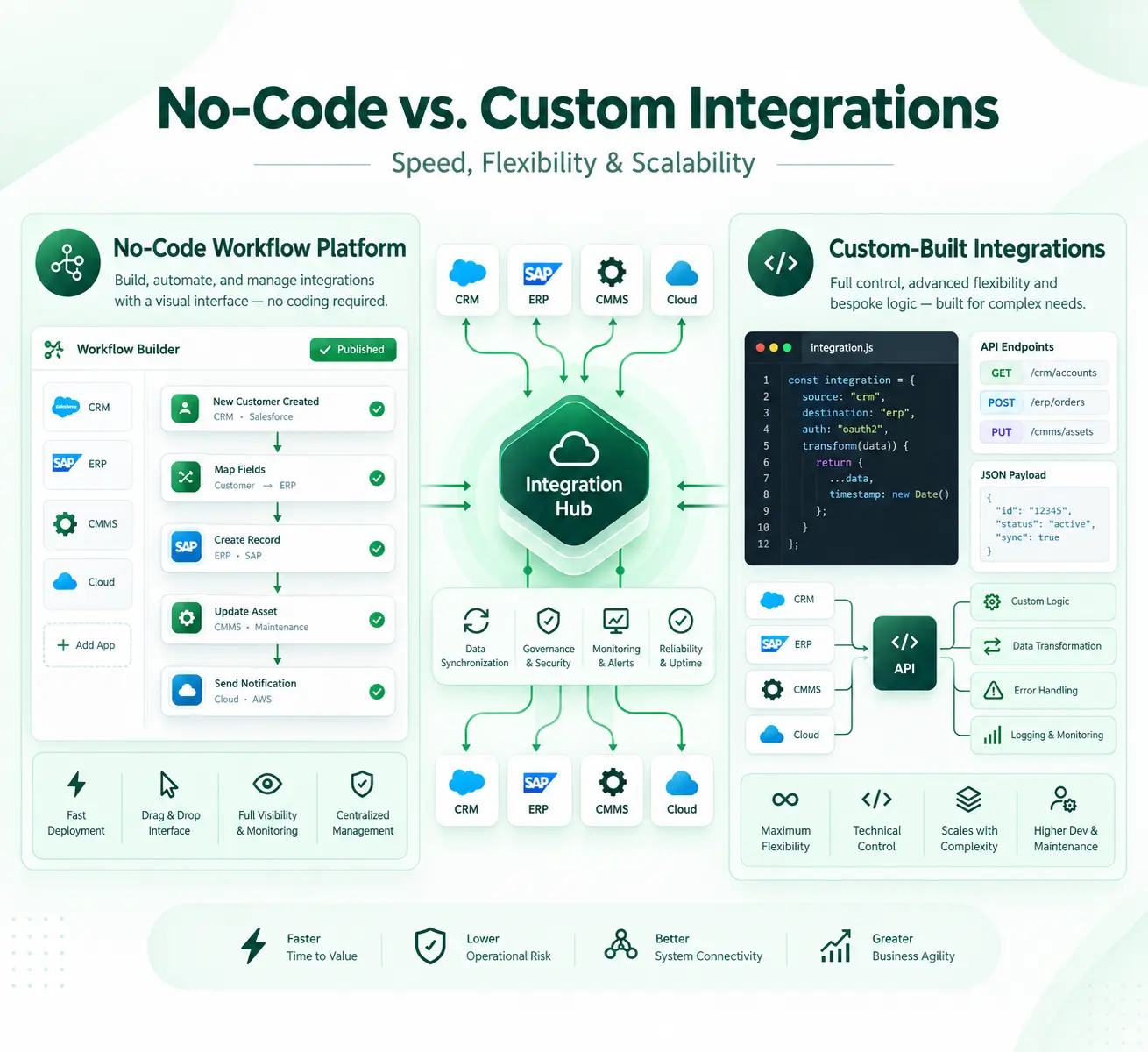
A no-code workflow builder puts that shift to practical use for operations. Drag-and-drop logic handles sources, transformations, and destinations with no scripting required, and pre-built connectors for the CMMS, ERP, and CRM systems facility and service teams already run cut weeks off a typical rollout.
Visual field mapping with schema validation surfaces errors before a workflow goes live rather than after, and a connector SDK extends coverage when a customer-specific or proprietary system needs to join the stack.
The practical effect is enterprise automation that scales with headcount rather than with the IT department’s backlog. A single ops lead can stand up an API integration between two systems in days and adjust it without re-opening a developer ticket every time a field changes.
How Operational iPaaS Alternatives Close the Gap in Practice
Closing the gap between a traditional platform and day-to-day operational reality comes down to a short set of practical decisions.
A usable evaluation checklist for executives comparing options:
- Can a non-technical ops lead build or edit a workflow without filing an IT ticket?
- Does the platform trigger on events in real time, or only on a fixed schedule?
- Are HIPAA, GDPR, or SOC 2 controls built into the workflow layer, or sold separately?
- Is there a live dashboard showing SLA status, rather than just a pass or fail log?
- Can the platform support multiple business units or client tenants from one console?
- How many of these existing systems – CMMS, ERP, CRM, and IoT – already have pre-made integrations out there today?
An enterprise integration platform built around operational speed, governed access, and compliance by default avoids that trap by matching the tool to the team that will actually run it day to day.
Where ConnectorHub Fits as an Operational iPaaS Alternative
ConnectorHub deals with this issue from an operational perspective, not an IT architecture one. The central component of ConnectorHub is a visual drag-and-drop workflow builder along with more than 100 connectors for the systems that these companies are using – CMMS, ERP, CRM, and various cloud-based platforms like Salesforce, NetSuite, SAP, Microsoft Dynamics 365, HubSpot, and CorrigoPRO.
SOC 2, HIPAA, and GDPR-aligned controls are built into every workflow by default, and access is locked down through encrypted credential storage and genuinely clean role-based tenant isolation.
With the help of the multi-tenant architecture, consultants and system integrators responsible for handling various customer environments can perform everything from one console.
Conclusion
Choosing between a traditional platform and an operational alternative really isn’t about checking boxes on a feature chart. It comes down to who actually builds the workflow, how quickly data moves once it’s live, and whether compliance and visibility were baked in from day one.
For mid-market and facility-focused teams, there’s a pretty simple test: can the people running day-to-day operations make a change themselves, without waiting on IT? And can leadership actually see, in real time, whether that change is holding up — under load, under audit? The platforms built around that question, rather than around enterprise API roadmaps, are the ones defining where this category is headed.