.svg)
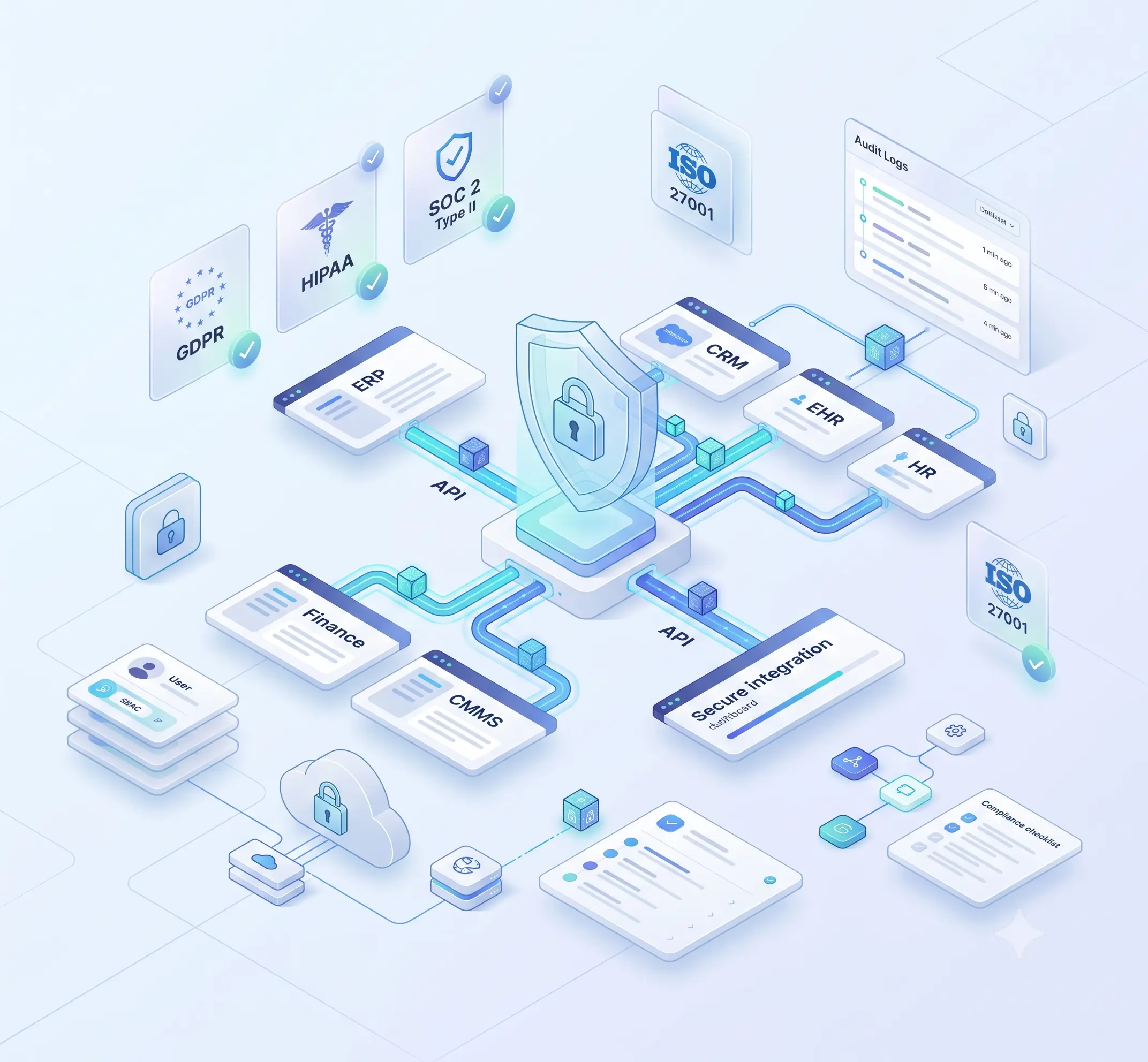
When executives evaluate an enterprise integration hub, security and compliance rarely top the initial criteria list. Speed to deploy, connector breadth, and total cost of ownership tend to dominate early conversations.
But the moment a HIPAA compliant integration platform or GDPR-compliant integration software becomes a contractual requirement, those secondary concerns move straight to the top of the priority list.
This checklist is designed to help executives who are in the process of evaluating enterprise-grade data security within iPaaS solutions. It covers the frameworks that actually matter, the technical controls you should be verifying, and the questions you need to be asking any vendor you are considering.
Why Integration Landscapes Carry Inherent Compliance Risk?
- The Hidden Attack Surface in Connected Systems
Most organizations think of their core systems like ERP, CRM, and EHR as locked-down perimeters. What doesn't get nearly enough attention is what's actually happening between those systems. API integration layers, middleware pipelines, and data transformation logic all create connections that tend to fly well under the radar of traditional security monitoring.
When data travels from a CRM to an ERP, the information travels through connecting layers that often lack the robust security checks of your main platforms. Because of this, just one minor mistake in mapping these fields can unintentionally expose highly sensitive personal records to employes without proper clearance. And a broken or unauthenticated webhook can turn into an entry point that bad actors are more than happy to exploit.
According to a Data Breach Report, third-party integrations and misconfigurations represent a consistently growing share of breach root causes in enterprise environments.
- The Business Impact of Insecure Integrations
The risks involved with insecure integrations are not limited to the actual data breach. In the absence of compliance audit logs, there will be no way to get a clear picture of what transpired during the incident. If the integration layer does not have any user-level permissions, it would only take a single compromised account to do lateral movements on all other platforms.
For mid-market companies, the fallout tends to concentrate in three very specific areas: the steep cost of scrambling to fix problems after the fact, the reputational damage that comes with clients who expect compliance attestations, and the ever-growing complexity of trying to stay on top of regulatory obligations across multiple jurisdictions.
Key Compliance Frameworks Every Executive Should Understand
Not every framework applies to every organization. What matters is knowing which ones govern your data, your clients' data, and the jurisdictions you operate in.
The table below highlights the four regulatory frameworks routinely evaluated when choosing an iPaaS solution. Every standard enforces distinct rules for your integration architecture.
Misunderstanding the specific differences between these strict requirements is an incredibly common error, frequently resulting in unexpected compliance vulnerabilities that can suddenly expose your entire organization to massive regulatory risks.
iPaaS Framework Checklist for Compliant Integrations
Use this as a working reference during vendor evaluation. Each item covers what the control is, why it matters in an integration context, what to specifically verify, and the warning sign that tells you a vendor is not taking it seriously.
1. Data Protection Across the Full Transmission Path
The real issue: Every vendor confirms they encrypt data. What they rarely clarify is where and when. Integration platforms handle data in transit, rest in queues and buffers, and during transformation. Those are three distinct states, each needing its own control. Most evaluations only check one.
Check for:
- TLS 1.2 minimum in transit, TLS 1.3 preferred for newer deployments
- Encryption for integrations at rest using AES-256 or equivalent
- Credentials (API keys, OAuth tokens) stored separately from config, never in plaintext
- No credential values exposed in logs or the platform UI
Push them on this: Where does data sit between workflow steps, for how long, and who on your team can access it?
Watch out for: Vendors who deflect general cloud security claims. If they cannot tell you specifically where credentials live, treat that as an unfavorable answer.
2. Identity Governance & Granular Access Architecture
The real issue: Many platforms still run on a basic admin versus read-only model. Teams patch the gaps through internal agreements rather than enforced controls. That holds up until an account is compromised, a contractor's access goes unrevoked, or an auditor asks for documented evidence of access restrictions.
Check for:
- User-level permissions by role with real functional separation, not just labels
- Tenant isolation enforced at the architecture level, not as a configuration toggle
- SSO compatibility with your existing identity provider
- MFA on by default, not listed under optional settings
Push them on this: Walk me through what happens to a user's access when they leave the organization. Who triggers it and what is the audit trail?
Watch out for: Optional MFA out of the box. Tenant isolation is described as a configuration setting rather than a structural guarantee.
3. Audit Trail Depth & Incident Readiness
The real issue: Compliance audit logs are the evidence you produce when a regulator or auditor asks what happened. Logging execution timestamps and pass/fail outcomes is activity tracking, not evidence. You need data lineage, user attribution, configuration change history, and records that cannot be edited after the fact.
Check for:
- Logs capturing who ran a workflow, what data moved, and how it was transformed
- Configuration changes tracked with before-and-after states
- Immutable audit records (no admin editing after the fact)
- Documented breach notification timeline in the contract
Push them on this: If something went wrong six months from now, how would we use your audit logs to reconstruct what happened? And is your incident response process joint or handled on your side only?
Watch out for: Breach notification timelines that only exist in conversation. Audit trails requiring reconstruction from system logs rather than the platform's own records.
4. Data Minimization & Exposure Reduction Controls
The real issue: Secure data transfer means moving only what is necessary, not just moving it safely. HIPAA's minimum necessary standard is a hard regulatory requirement. It means integration data flows need to be scoped to what the receiving system actually needs, with sensitive fields masked everywhere else. Many platforms do not support this at the configuration level without a professional services engagement.
Check for:
- Field-level masking and pseudonymization configurable by admins, no custom dev required
- Sensitive fields filterable from logs, UI previews, and downstream writes independently
- Data residency controls to restrict processing to a defined geographic region
Push them on this: Show me how a PII field gets masked in workflow logs without changing what gets written to the destination system.
Watch out for: Masking that only applies at the UI layer but still writes raw values to logs. Data residency listed as a future roadmap item.
5. API Security & Network-Level Controls
The real issue: Secure API management at the integration layer handles what downstream API security cannot. The platform sits between your systems, making calls on behalf of users. Rate limiting, request validation, and IP allowlisting all need to operate at that middle layer. For sensitive workloads, routing everything over public infrastructure is a risk that has a straightforward solution if the vendor supports it.
Check for:
- Native OAuth 2.0 and API key rotation without workflow rebuilds
- Rate limiting and request validation at the integration layer
- VPC or private endpoint options as an alternative to public routing
Push them on this: If we rotate an API credential for a connected system, does that require reconfiguring the workflow or just updating the credential?
Watch out for: Credential rotation that forces workflow rebuilds. No private network connectivity option available for enterprise deployments.
6. Vulnerability Management & Vendor Security Program
The real issue: A platform that looks secure at procurement can develop gaps through connector updates, patches, and infrastructure changes. How a vendor manages their own release security is as important as the controls in the product. No documented pen testing program means you are trusting internal practices with no external verification.
Check for:
- Annual third-party penetration testing with a summary available on request
- Documented CVE response process and patch distribution timelines
- Published responsible disclosure policy
- RTO and RPO figures documented in writing, not just stated verbally
Push them on this: What was the most significant finding from your last pen test and what was the resolution timeline?
Watch out for: No third-party pen test on record. RTO and RPO numbers that only come up in sales calls and never appear in the contract.
Evaluating an iPaaS Provider's Security Posture
Security marketing language is nearly uniform across vendors. The words "secure," "enterprise-grade," and "compliant" appear on virtually every homepage. The differentiators emerge when you request documentation.
To ensure a thorough evaluation, ask for their complete SOC 2 Type II audit report, skipping mere summaries. Carefully review any auditor's issues and the way management addresses them. Then, obtain the ISO 27001 certificate, its scope of information, and the most recent independent penetration test report executive summary.
According to GDPR, it is necessary to document all sub-processors by processors, which is shown by the list provided. A vendor routing data through sub-processors in jurisdictions with weak privacy protections creates contractual complexity regardless of their headline compliance claims.
Ask whether employees have access to customer data as part of normal operations, and under what oversight. Those answers distinguish platforms built with security by design from those that have layered compliance documentation onto open architectures.
Cloud Integration Software with Built-In Compliance Architecture
Systems built for highly regulated sectors must prove security is hardwired, not just promised. True structural security ensures the platform physically prevents critical errors like exposing passwords or sharing client records. Conversely, basic policy compliance simply provides written guidelines prohibiting these actions, leaving your team fully responsible for manually policing and enforcing every single rule.
A cloud-based integration platform operating under AWS or Azure infrastructure inherits certain baseline certifications from the cloud provider. This does not automatically extend to the application layer. Ensure the vendor independently proves their software security, rather than simply relying upon their cloud host's credentials.
Essential Practices for Protecting Integrated Systems
- Govern Data Access Before Connecting Systems
The configuration decisions made at integration setup define the security posture for the lifetime of that integration. Before establishing any new connection through a data integration platform, conduct a data classification exercise.
Identify what types of data will be shared across the integration, what the data sensitivity level is, and the controls needed for managing such a data sensitivity level. It is important to have field-level data masking, limits of scope for the API credential, and data flow limited by purpose in place.
Automation processes operate at the speed of software. Without upfront data governance, a misconfiguration propagates continuously until it is discovered and corrected.
- Maintain Security Hygiene Across the Integration Lifecycle
Enterprise automation changes the form of security obligations rather than eliminating them. API credential rotation, permission audits as team members change roles, and regular audit log reviews are the controls that remain effective over time.
Security breaches rarely happen on day one. Usually, things just get messy over time. Maybe a former worker still has access, or an old connection gets hacked. To stop this, check your systems regularly. Do it every few months, or at least once a year. Just verify passwords, permissions, and spot any weird activity.
- Build Security Awareness into Implementation Teams
The technical controls in a well-designed integration layer are only as effective as the people configuring and maintaining them. Teams building and operating automated business process workflows need to understand, at a working level, the compliance obligations associated with the data those workflows handle.
This requires defining clear internal reporting channels: deciding when to engage privacy officers, mandate thorough security audits, and alert legal counsel. Companies utilizing these structured protocols consistently make stronger, more secure integration choices than teams viewing compliance as strictly an isolated IT issue.
How ConnectorHub Supports Secure, Compliant Integrations
Organizations across facility management, healthcare, real estate, and industrial services rely on CRM integration, ERP connectivity, and operational data pipelines to keep critical business processes running. Because these systems handle sensitive business and customer information, security and compliance must be built into the integration platform from the start. ConnectorHub is designed with that principle at its core.
All data is encrypted both in transit and at rest, helping protect information throughout every stage of the integration lifecycle. Connection credentials are stored in a secure, encrypted vault, ensuring API keys, passwords, and authentication tokens are never exposed in user interfaces, workflow logs, or system activity records.
ConnectorHub enforces role-based access control (RBAC) and tenant isolation at the architectural level. Each tenant operates within its own isolated environment, with separate data, configurations, and runtime resources. Cross-tenant access is prevented by design, while SSO-ready authentication integrates with enterprise identity providers to simplify access management and strengthen governance.
Every workflow execution produces a complete, immutable audit trail with run-level visibility, configuration history, and SLA monitoring. These detailed logs support HIPAA and GDPR integration compliance, along with SOC 2 requirements, making it easier for organizations to meet internal governance standards and external audit requirements.
Whether you are integrating CMMS, ERP, EHR, or CRM platforms, ConnectorHub helps you automate the process without compromising security or compliance. With built-in RBAC, encrypted credential management, tenant isolation, and GDPR-aligned data handling, your implementation team can focus on delivering business outcomes instead of building compliance controls from scratch.
Conclusion
Maintaining integration security and compliance is an ongoing responsibility, rather than a simple checklist completed during vendor selection. This dedication extends from high-level platform architecture choices down to the daily management of your active workflows.
The frameworks that matter are not obstacles to operational efficiency. They are the structural conditions under which software integration services can be trusted by clients, partners, and regulators. Companies that build compliance into their core framework waste less energy fixing avoidable errors. Instead, they dedicate those hours toward maximizing the strategic value their integrations deliver. The right integration foundation does not just connect your systems. It protects them.