.svg)
How often do you think the people who truly keep everyday workflows moving and the ones with the coding expertise to manage an enterprise tech stack are the same individuals?
Well, almost never.
This disconnects between seeing the problem and knowing how to code the fix causes endless delays, forces teams into miserable daily hacks that somehow stay forever and leaves us with expensive new systems that technically turn on but entirely miss the actual point.
This is where today’s AI workflow automation tools bring about a substantial difference because they finally understand normal, everyday language. You can simply say, "When a new order hits our system, immediately update the database and ping the manager," and the software instantly builds a flawless, working connection in mere seconds.
For businesses, Large Language Model (LLM) integration basically means plugging that same language intelligence into your iPaaS platform, so it can understand what you are asking and turn it into actual, working automation. Instead of manually setting up triggers and actions through some clunky visual interface, you just say what you need to automate the process and the model handles the heavy lifting, figuring out which connectors and steps belong where.
The result is a fully executable workflow, built from a simple description rather than hours of technical setup, delivering truly workflows. Nobody has to write messy support tickets, schedule endless meetings, or wait around helplessly for busy developers.
Introduction to AI-Powered Workflow Generation
A workflow AI builder is where LLM integration actually comes to life inside an AI-ready integration platform. It's the space where a business user simply types out what a process should look like, the AI takes that description and sketches out a working workflow, and the user goes through it, tweaks whatever needs adjusting, and hits publish — all without touching a single line of code.
A strong no-code integration builder does not just generate the initial draft. It supports conversational refinement, handles conditional logic, and flags anything that still needs human input before the workflow goes live.
The three concepts that emerge as core to understanding this notion are AI entering enterprise automation, LLM integration as the engine, and workflow AI builders as the interface.
The goal is not to sell you on a technology trend. It's to give you a clear operational picture of what's possible today, where real-world friction still exists, and how organizations across industries are putting it to work.
Why Traditional Integration Workflows Slow You Down?
The key problem with how most organizations handle integrations is not a technology problem. It's a translation problem.
Business teams already know exactly what needs to happen — notify the account manager when a form comes in, sync a new work order to operations, push an approved invoice to finance. The logic is obvious. But translating that into something developers can build, test, and maintain when things break? That's an entirely different problem, and it never moves as fast as the business needs it to.
Most traditional workflow automation tools run through the same exhausting routine: sit through requirements meetings, sketch out a solution, build the thing, put it through testing, fix what breaks, then finally get it out the door.
For genuinely complex, mission-critical systems, all that rigor makes sense. But plenty of integration needs aren't that serious, they are just repetitive data routing tasks that happen again throughout the day. Running every single one through a full development cycle is overkill, and honestly, it just doesn't scale.
The result is a backlog. Integration requests pile up, manual workarounds take their place, and the data inconsistencies those workarounds create become their own operational problem. Non-technical teams have no self-service path. Point-to-point connectors break every time a vendor updates their API. Small automation requests compete with complex system projects for the same limited IT bandwidth. Organizations end up managing consequences instead of building capabilities.
The Rise of Natural Language Automation
Natural language automation is not a feature. It's a shift in who can build integrations and how quickly.
The way it works is actually pretty simple. Large language models are built to read what you write, understand what you are trying to accomplish, and turn that into structured output. When the platform underneath is an iPaaS with intelligent capabilities, that structured output becomes a workflow schema — a complete blueprint of triggers, conditions, and actions that the system can render as a visual flow and run directly against your connected applications.
What separates useful implementations from surface-level demos is conversational refinement. This completely changes who creates business process automation today: the frontline worker directly builds the solution, while the tech team manages it.
The Operational Mechanics Behind AI-Powered Workflow Generation
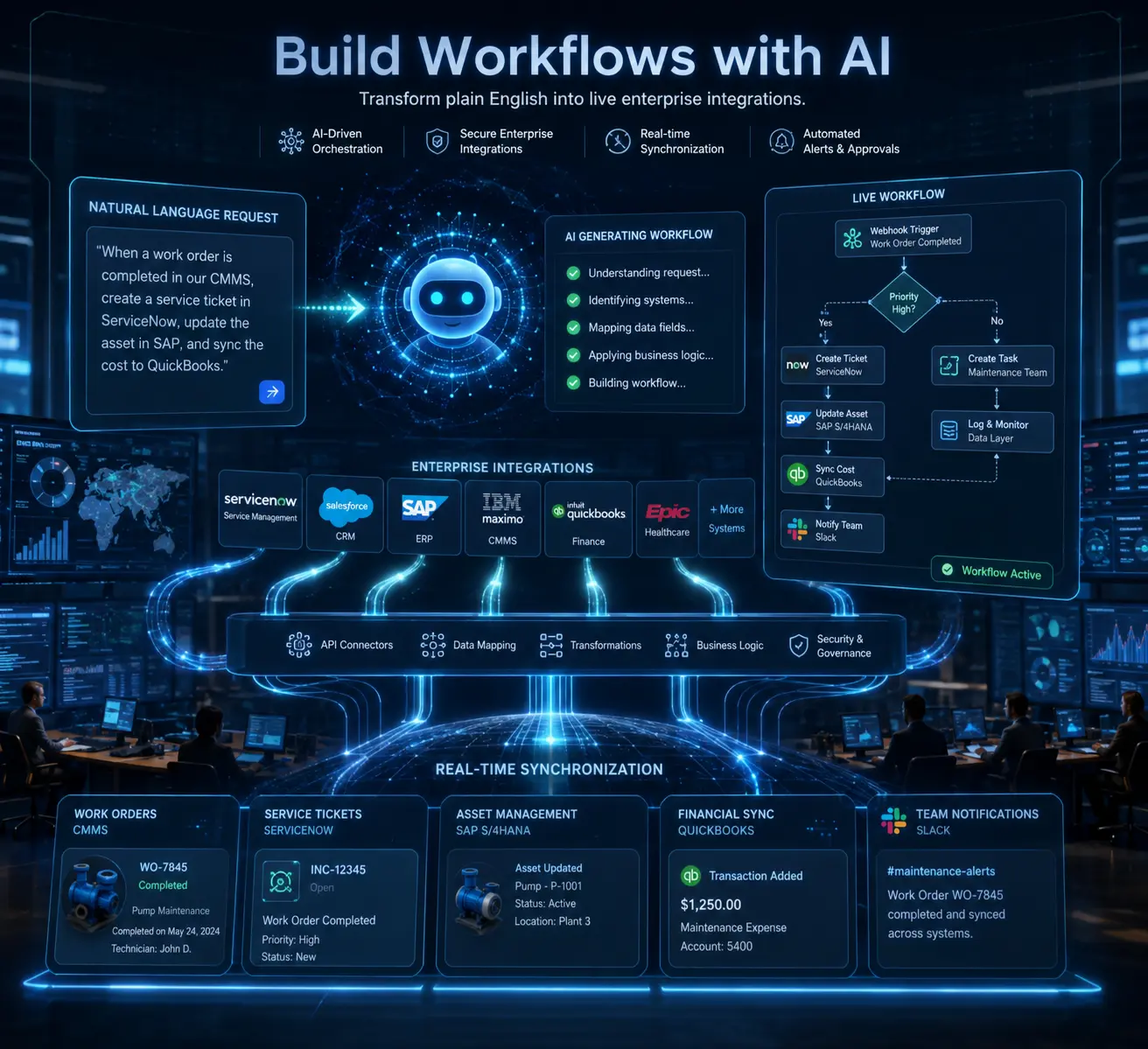
When a user enters a prompt into an AI workflow builder, the LLM maps the request to the available components in the integration platform such as connected applications, trigger types, the action library and produces a structured workflow definition the platform renders visually.
Between the intelligent model and your core business systems sits a vital coordination and orchestration layer. This system turns everyday language into functional processes and securely manages the connections linking to your applications.
Advanced platforms offer three distinct ways to work:
- Direct creation (explain your needs, the AI builds it)
- Conversational editing (ask for specific adjustments clearly)
- Strategic planning (map the workflow steps carefully before finalizing everything)
Best Practices to Natural Language Workflow Automation
Adopting AI workflow generation is not technically complicated, but skipping a few foundational steps tends to cost more time later than setting them up properly at the start.
- Prompt quality determines output quality.
Vague prompts produce vague workflows. Teams that describe processes with precision, specifying timing, systems, conditions, and expected output get accurate drafts on the first attempt. Building internal prompt templates for the most common automation patterns is a practical early investment.
- Security and compliance cannot be retrofitted.
Before introducing an integration platform into strict environments, companies must thoroughly examine their administrative framework. This includes ensuring SOC 2 and GDPR standards, detailed activity records, protected password management, strict user permissions, and keeping distinct business units safely separated from one another.
- Human review is not optional.
An ambiguous prompt can produce a plausible-looking workflow that fires on the wrong trigger or misses a condition. Review before publishing is not bureaucracy, it's the difference between an automation that works and one that creates silent data problems for weeks.
- Change management takes longer than setup.
The tool being available does not mean people will use it. Designating workflow owners, running short onboarding sessions, and building a library of approved prompt templates removes the friction that stalls adoption early.
A Deep Dive into ConnectorHub’s AI Workflow Generation
ConnectorHub is built for organizations that need more than a visual integration platform with a prompt box. The real operational requirement is a platform that handles integration complexity across CMMS, ERP, and CRM systems and governs that complexity at the enterprise level.
The AI workflow generation capability turns plain English descriptions into complete, structured automations. Business users simply describe what they need, the AI puts together an initial workflow, and the team looks it over, makes any adjustments, and publishes it, without ever touching a line of code. For organizations where IT bandwidth is a constraint, and business teams are closest to the process of problems, that accessibility is the point.
Here's how a complete build progresses on ConnectorHub:
What the platform includes:
- Drag-and-drop workflow builder with auto-fetched field schemas and live preview validation
- Flexible scheduling and real-time webhook triggers
- Versioning and instant rollback with no disruption to in-flight workflow runs
- Inline data transformations and field mapping with schema validation
- Plug-and-play integrations for ServiceNow, Salesforce, Corrigo, QuickBooks, Nuvolo, and 100+ additional connectors
- SOC 2, HIPAA, and GDPR-aligned audit logs with encrypted credential storage and tenant isolation
For organizations evaluating iPaaS solutions, ConnectorHub acts as a structural foundation preparing information for future AI capabilities. This ensures accurate, instant data from connected systems flows directly into analytics tools, forecasting models, and smart agents without requiring complex manual programming.
The business case holds across industries. IT service desk teams describe routing and escalation logic in natural language and have a working automation live the same day. Healthcare organizations keep EMR, CMMS, and ERP systems in sync through automated workflows to reduce audit preparation time and eliminate the risk of clinical or financial decisions made on stale data.
Most integrations are up and running within two to four weeks. Enterprise automation projects that once consumed months of IT planning start moving in days when the build interface meets business teams where they already are, speaking the same plain language they use at work.
Also Read: How AI-Powered Workflow Automation Is Changing Enterprise Integrations in 2026?
Conclusion
The practical implication of AI workflow generation is not that integration becomes effortless. It's that the effort shifts from technical build to process clarity. The organizations that benefit most are the ones that can describe their workflows precisely, and that's a business skill, not a technical one.
Start with the process your team complains about most. The one where data gets re-entered manually, where notifications are missed, where someone checks a system every morning because there's no automated flag. Describe it clearly, run it through an AI builder, review what comes back.
ConnectorHub makes it possible to move from workflow idea to functional automation in hours instead of quarters. Explore today.