.svg)

Salesforce and ServiceNow solve two different problems. Salesforce manages customer relationships. ServiceNow manages the operational work behind it. That split is by design.
Now, the real trouble starts when facility organizations run both platforms without a connected workflow between them. A case gets closed in Salesforce while the matching incident stays open in ServiceNow. A work order updates in one system and never reaches the other. No one realizes this issue until an auditor or a finance manager queries about the discrepancy.
Facility management integration has become the difference between a portfolio that runs on real-time data and one that runs on manual follow-ups and guesswork. Here we break down why the Salesforce-ServiceNow gap exists, why most legacy fixes fall short, and what genuine CMMS ERP integration built around no-code integration for facility management and real workflow automation for facilities, looks like in practice.
The Growing Complexity of Facility Management in Enterprise Environments
Facility management in 2026 is of greater importance operationally speaking than ever before in recent years. Hybrid work models have become established and permanent with variable occupancy. Budgets have not kept pace with the added complexity that creates.
A major 2026 industry survey on facility management highlights this squeeze clearly. Fully 78% of FM teams say budget limits are holding back their modernization efforts, even while 92% point to energy management as their single biggest opportunity for cost savings.
80% say offline capability matters to daily operations, yet only 51% find their current tools easy to use. That gap between expectation and usability is exactly where facility teams lose the most time.
Governance has changed too. Auditors once showed up once a year. Compliance now behaves more like a daily requirement, with documentation expected on demand rather than assembled the week before a review.
Predictive maintenance, system consolidation, and ESG reporting have all moved from future initiatives to line items leadership expects progress on this quarter.
When facility leaders constantly field the exact same questions from accounting, tenants, and compliance officials, this isn't a staff training issue. This is a system breakdown, and an enterprise integration platform that connects CMMS, ERP, and CRM systems can turn these stressful fire drills into simple, intuitive reports.
The Gap Between Salesforce & ServiceNow Is Bigger Than You Think
Salesforce holds the account, the lease terms, the vendor contract, and the SLA. ServiceNow holds the incident, the work order, and the technician assigned to fix it.
A facility request that starts as a tenant complaint in Salesforce has to become an actionable ticket in ServiceNow. The update then needs to travel back once the work is done. Without a proper CRM integration connecting the two, that hand-off happens by hand.
Here is what that typically looks like inside a facility operation. A property manager logs a request, then retypes it into the work order system. IT or facilities acts on the case in ServiceNow with no automatic transfer back to Salesforce.
From there, SLA clocks in the CRM case drift out of sync with the actual maintenance ticket. Asset records fall out of date the moment a vendor swaps a part without logging it back. Without dependable facility data synchronization between the two platforms, small mismatches compound into missed SLAs and duplicate vendor invoices.
Why Legacy Integration Methods Keep Failing Enterprises
Conventional methods for ServiceNow and Salesforce integrations frequently fail in enterprise environments due to inherent limitations in scalability, maintainability, and adaptability.
- Data Synchronization & Consistency Issues
Different data models, schemas and data formats of the systems cause inconsistencies, duplicate or missing records in the other system. Real-time synchronization across the systems is extremely difficult. The older setups utilize batch jobs or polling, which in turn have lags and data is stale.
- Brittle Custom Code & High Maintenance Overhead
REST API integration or in-house scripts requires technical expertise on both the systems. Any release of the systems (Salesforce releases thrice a year; ServiceNow is also a major release) can break mappings, authentication, or business logic of the integration. Industry standard estimates are that basic Salesforce and ServiceNow projects can range from $5,000 to $15,000, with more expensive ones starting above $30,000 and costing an additional $2,000 to $5000.
- Scalability & Performance Challenges
The system is not able to handle the large volume of data or complex workflows with legacy approaches. The systems have API call limits (particularly with Salesforce); inefficient polling or expensive external calls would degrade the performance of one or both systems. An integration may function fine for small POC but might not scale to enterprise usage leading to timeouts or throttling.
- Complex Workflow Automation Across Platforms
End-to-end process automation (e.g., case incident updates approvals) are often complicated due to different business process models of both systems. The old legacy approach has difficult to maintain retries, error handling and idempotency and infinite sync loops and is prone to bugs. They use flags or custom code that is usually not robust and correctly implemented.
- Security, Compliance & Governance Risks
The exposed API/connectors have potential risks. It's extremely error-prone to provide encryption, maintain audit logs, establish access control and ensure compliance to various regulations like GDPR, HIPAA etc for custom setups.
- High Costs & Drain on Resources
The initial investment may appear cheap, however ongoing maintenance, monitoring and fixing will be substantial for the developer resources and budget. Extreme customization locks the integration to the current process and changing it is very costly. Many clients underestimate the Total Cost of Ownership (TCO).
- Inflexibility for Changing Needs
Business processes evolve over time (new fields, new business processes, addition of other systems like SAP/Oracle etc). The legacy point-to-point integrations aren't built to adapt to changes. This results in silos or rip and replace projects. It is also difficult to obtain real time insights or unified reporting across the systems.
The Smart Shift to Intelligent and Agentic Integration
The shift happening now isn't just about connecting two more systems. It's about building an architecture that can support many systems, and increasingly, many AI agents acting on top of them.
Salesforce's 2026 Connectivity Benchmark Report surveyed 1,050 enterprise IT leaders and found a clear disconnect between ambition and infrastructure. 96% say AI agent success depends on integration across systems, yet only 27% of enterprise applications are actually integrated together.
The applications used in an average company rose from 957 to 1,046 in just one year, while 50% of AI assistants that are being used work in silos and not as a team.
Studies show that 40% of enterprise applications will feature purpose-built AI agents for defined use cases by the end of 2026, up from less than 5% in 2025. For facilities, this means there will be a need for a maintenance-scheduling agent, a compliance-reporting agent, and a vendor-dispatch agent all pulling from a common data pool; otherwise, each will make decisions from incomplete views of what is actually occurring on the ground.
Facility integration is no longer going to be through point products, but will need to take place over an API-enabled, unified architecture; the days of one-way data integration and manual governance are over as 2-way sync, AI-driven field mapping, and embedded governance are already table stakes.
Step-by-Step Implementation Guide for ServiceNow + Salesforce Integration
Here we talk about the most common approaches: native ServiceNow Integration Hub Spoke (recommended starting point for many), iPaaS/middleware, and custom API for advanced needs:
Before any technical work:
- Define use cases clearly: E.g., Salesforce Case → ServiceNow Incident creation; bidirectional status/priority sync; asset/CI lookup; knowledge article sharing.
- Map data models: Document fields, transformations, ownership (which system is authoritative?), and conflict resolution rules. Include custom fields.
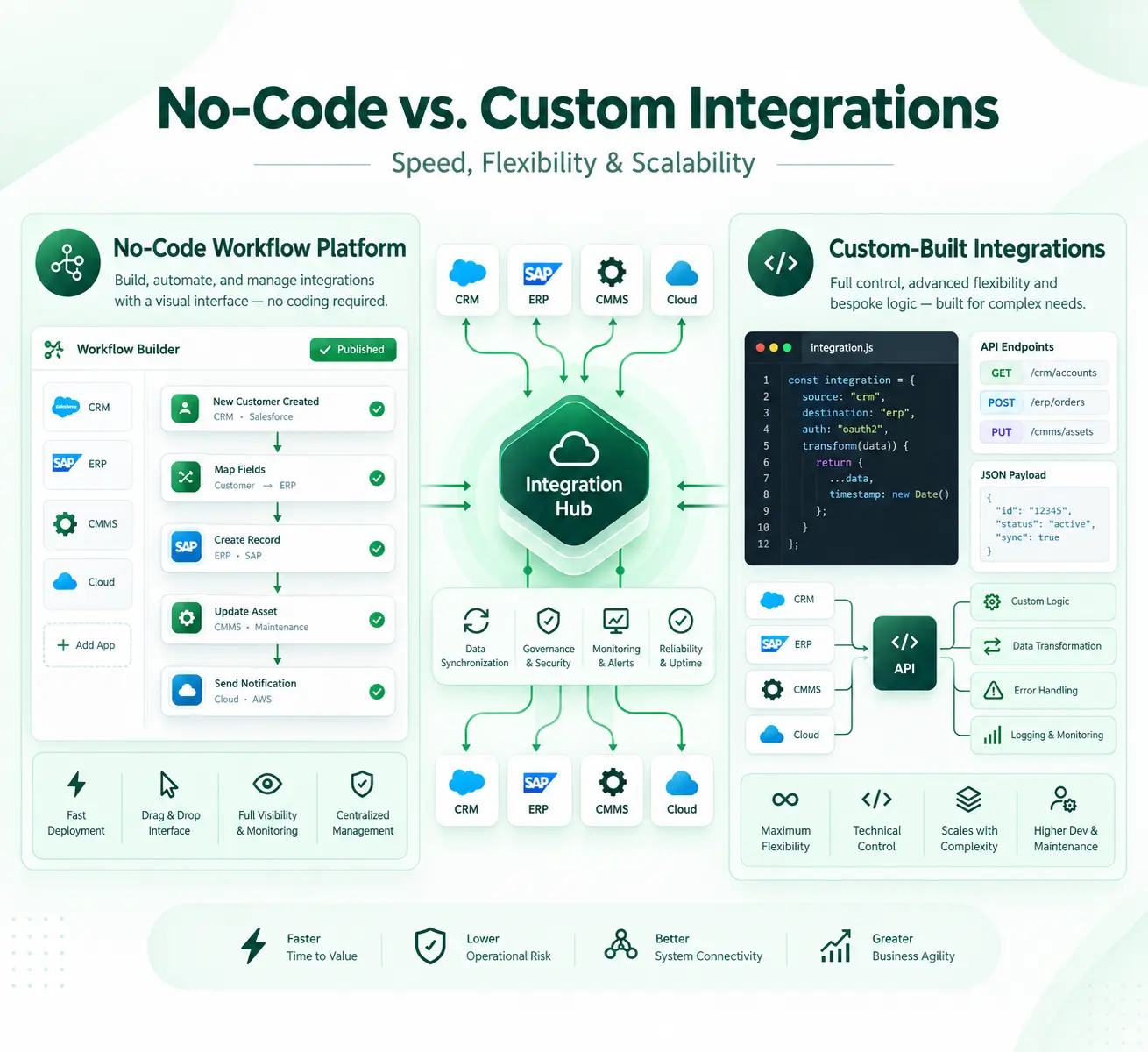
- Choose architecture: Native Spoke for standard flows; iPaaS for flexibility/scalability; custom for maximum control (but highest maintenance).
- Assess prerequisites: Licenses (Integration Hub for Spoke), admin access, sandboxes, compliance/security requirements.
- Identify KPIs: Sync success rate (>99%), latency (<30s for real-time), MTTR improvement, error rates.
- Risks to plan for: API limits, schema drift, sync loops, duplicates, token expiration.
Method 1: Using ServiceNow Integration Hub Salesforce Spoke (Low-Code, Native)
This is often the fastest for bidirectional or ServiceNow-centric flows.
- Verify and Activate Integration Hub + Spoke : Confirm Integration Hub is licensed and activated. Install/activate the Salesforce Spoke via the ServiceNow Store if needed. Check compatibility with your Salesforce edition (Sales Cloud, Service Cloud, etc.).
- Set Up Authentication in Salesforce
- Log in as Salesforce Admin → Setup → Apps → Connected Apps → New.
- Configure OAuth: Enable OAuth, set scopes (e.g., api, refresh_token), Callback URL (from ServiceNow).
- Set Refresh Token Policy to "Refresh token is valid until revoked."
- Save and note Consumer Key (Client ID) and Consumer Secret.
- Configure Connection in ServiceNow
- Navigate to Connections & Credentials or Integration Hub → Connections.
- Create a new Connection & Credential for Salesforce.
- Enter Instance URL, OAuth Client ID/Secret, and Redirect URL.
- Authorize: Click to get OAuth token (use Salesforce admin credentials). Test the connection.
- Build Flows in Flow Designer or Workflow Studio
- Create a new Flow. Use Spoke actions (e.g., Create/Update Salesforce Case, Get Account).
- Set triggers (e.g., Record Created/Updated in ServiceNow or Salesforce via inbound webhooks/polling).
- Map fields, add logic (scripts for transformations, conditions, error handling).
- Implement best practices: Idempotency (check external IDs), loop prevention (flags like "updated_by_integration"), retries.
- Test Thoroughly
- Use sandboxes. Test happy paths, edge cases (missing fields, high volume, failures, concurrent updates).
- Monitor via Integration Hub logs and Flow execution history.
- Go Live and Monitor
- Deploy to production with a kill switch.
- Set up alerts, monitor API usage, and review logs regularly.
- Schedule periodic reviews for schema changes post-upgrades.
Method 2: iPaaS or Middleware
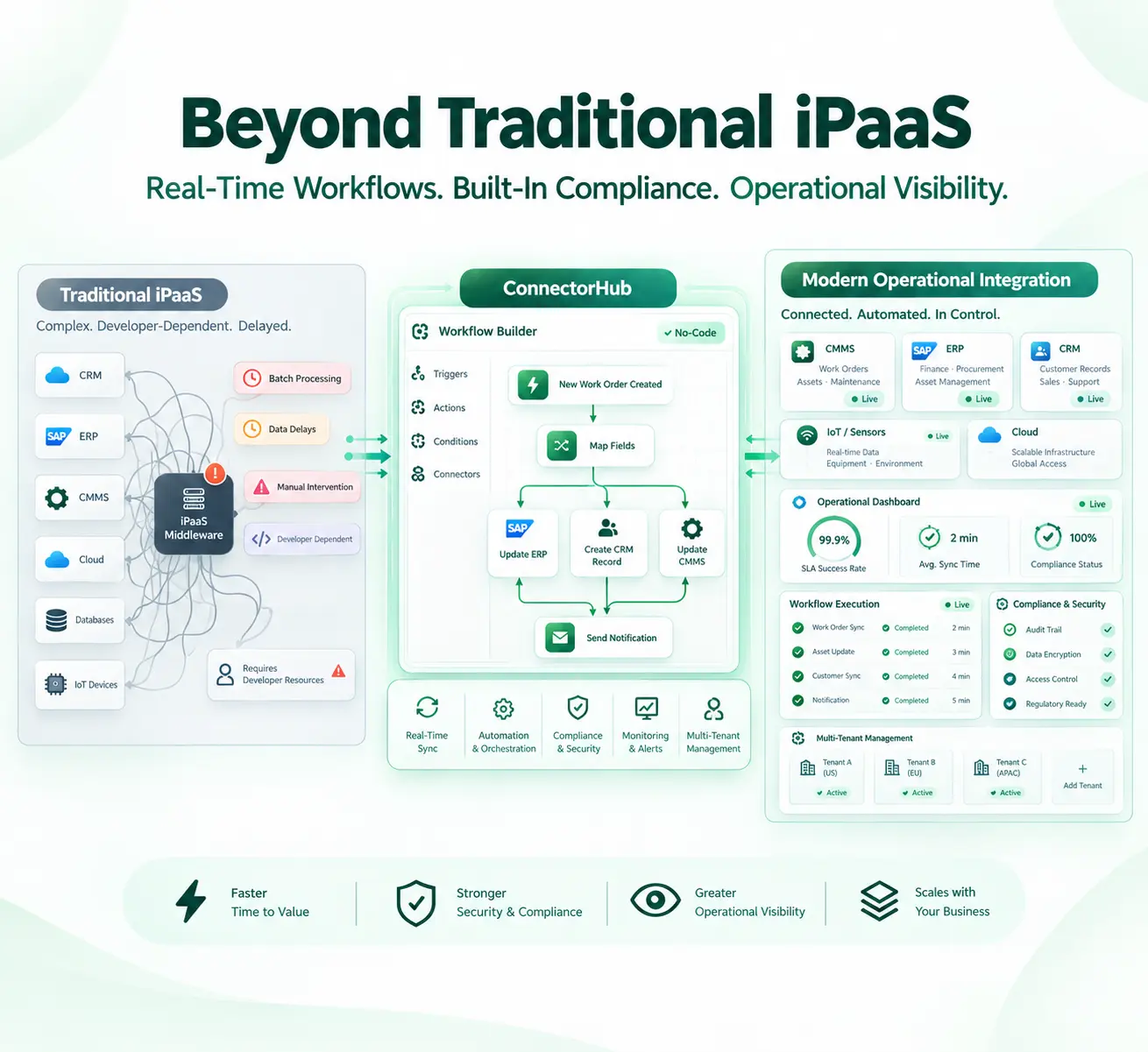
Platforms like ConnectorHub offer no/low-code, monitoring, and easier maintenance.
- Select and Set Up Platform: Evaluate based on volume, existing stack, and skills. Sign up/provision.
- Connect Both Platforms
- Authenticate via OAuth (same as above for Salesforce; similar for ServiceNow).
- Grant minimal required permissions (least privilege).
- Define Triggers and Workflows
- Set event-based triggers (new/updated Case, Incident, etc.).
- Build recipes/flows for your use cases.
- Data Mapping and Transformations
- Visually map fields with built-in transformers for formats, lookups, calculations.
- Handle attachments, rich text, relationships.
- Add Error Handling, Retry, and Monitoring
- Configure notifications, dead-letter queues, logging.
- Implement business rules (e.g., filters, approvals).
- Test, Deploy, and Optimize
- Pilot with subset of data/users.
- Go live with phased rollout. Monitor dashboards for performance.
- Iterate based on KPIs and feedback.
With no-code and low-code iPaas solutions, both this approach has become much more accessible than using custom code alone, although they both require some initial set up and ownership.
Method 3: Custom REST API Integration
Use when native/iPaaS don't suffice (e.g., highly unique logic).
- Set Up OAuth/Authentication (as in Step 2 above for both sides).
- Develop Integration Logic
- In ServiceNow: Create Outbound REST Messages or use Scripted REST APIs.
- In Salesforce: Apex classes/triggers for callouts or Platform Events.
- Or use external middleware (Node.js, Python, etc.) for orchestration.
- Implement Key Patterns
- Webhooks for real-time where possible.
- Batch APIs for volume.
- Store correlation IDs/external IDs for matching records.
- Secure and Test Extensively
- Handle rate limits, token refresh, retries with exponential backoff.
- CI/CD for deployments.
- Deploy with Monitoring
- Use logging tools, APM, and alerts.
For the latest official steps, always cross-reference ServiceNow Docs (Integration Hub Salesforce Spoke) and Salesforce Trailhead. If your environment has specifics (e.g., high volume, custom objects, or regulatory needs), consider partnering with certified consultants.
Best Practices for Facility-Specific Rollouts
- Data consistency: Decide which system owns each field. Salesforce should hold account and SLA terms, and ServiceNow should hold incident status and technician notes, so nobody argues over which number is correct during a renewal call.
- Security: OAuth should be used with the principle of least privilege API scopes and there should be a record kept of each and every field exchanged.
- Stakeholder alignment: Bring in whoever manages Corrigo, FMX, or Nuvolo data early. Facility-specific fields get missed when only Salesforce and ServiceNow admins are in the room.
- Iterative rollout: Start with one workflow, such as work order creation. Prove it holds for a couple of weeks, then extend to asset sync and SLA tracking rather than launching everything at once.
Both paths get the job done. But they ask a lot of an internal team that is already stretched thin, and that is exactly the gap platforms built specifically for facility operations are meant to close.
A Smarter Salesforce and ServiceNow Integration Strategy with ConnectorHub
ConnectorHub was built to close this exact gap for facility teams, rather than to serve as a generic enterprise connector.
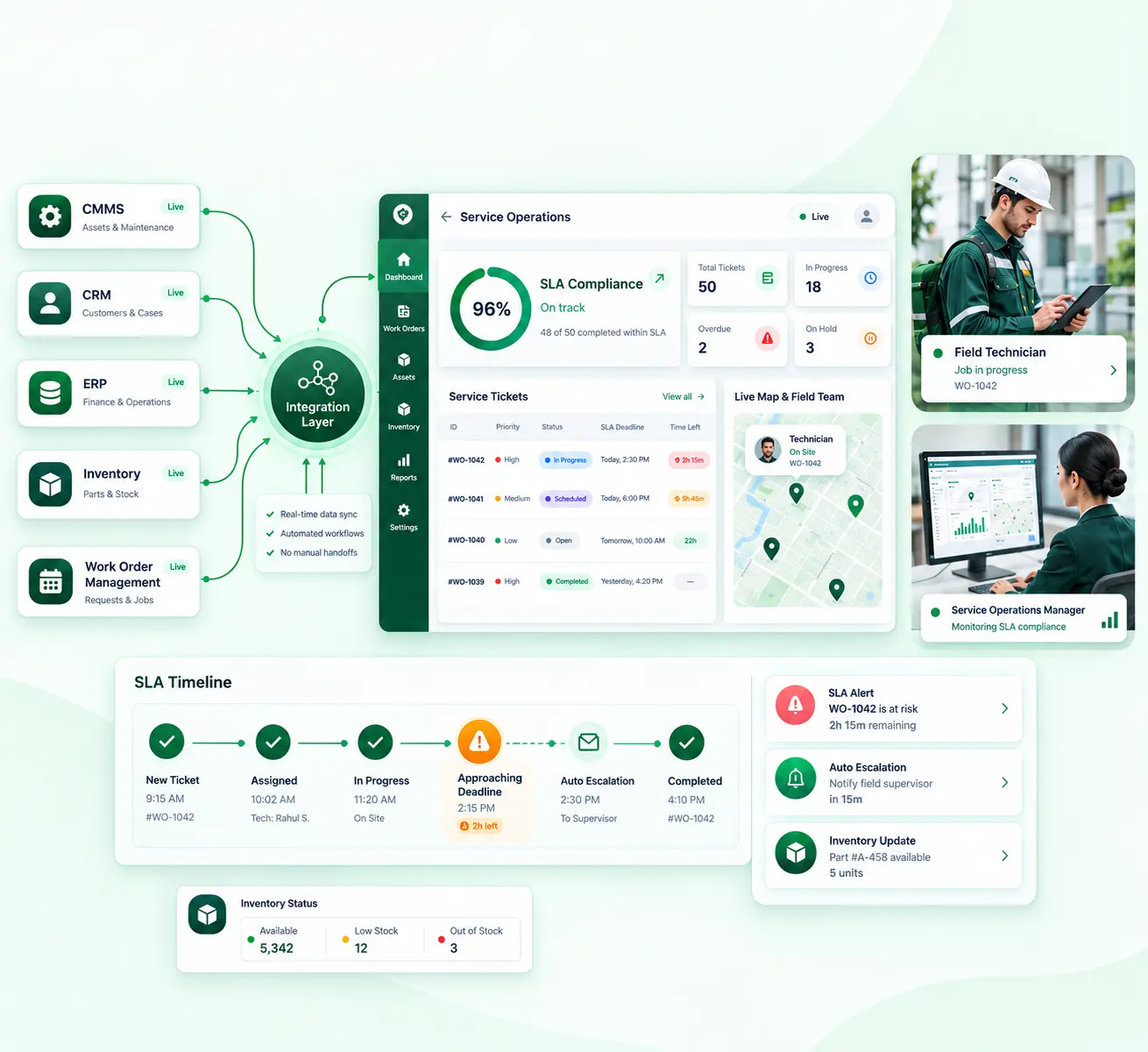
Instead of building a custom bridge between Salesforce and ServiceNow from scratch, it ships with ready FMX, Corrigo and Nuvolo integrations alongside ERP and CRM connectors. Work orders, assets, and service requests move automatically instead of waiting on someone to retype them.
The work orders generated using Corrigo and FMX would flow directly to the ERP/CRM for reporting. Completion updates come back the same way, and asset records stay current across every connected system without anyone touching a spreadsheet.
Facility teams using ConnectorHub report:
- More than 500 administrative hours saved per year
- 30 to 40% fewer SLA breaches
- 98%+ data accuracy across connected platforms
- Deployments live in weeks, not months
Each workflow is supported by role-based access control, data encryption both in transit and in rest, and complete logging within a secure AWS infrastructure. This is important for facility organizations that need to be compliant when asked and not just once per year.
For service providers juggling multiple client systems at once, this kind of integration solution for FM service providers replaces duplicate data entry with one automated business process that keeps CRM, CMMS, and ERP records honest across every account.
Conclusion
When Salesforce and ServiceNow operate in silos, it creates more than technical frustration. It quietly drains team trust, wastes your budget, and consumes staff time every week you wait.
Most facility teams fall behind in the same few ways. Slow response times hurt tenant and customer trust, while entering data twice burns administrative hours better spent doing meaningful work.
SLA issues usually stay hidden until audits or renewals, when the damage is already done. Reporting blind spots hold back leadership decisions right when quick action counts most.
Facility leaders don't need another six-month custom-built project to close that gap. What most portfolios need is a connected system built for how CMMS, ERP, and CRM data actually move together in the field, not a repurposed version of generic application integration solutions built for a different problem.
If your team is still copying data between Salesforce and ServiceNow by hand, that is worth a closer look before the next budget cycle starts.