.svg)

We spend a significant portion of our week here at ConnectorHub sitting on calls with IT leads, system architects, and operations directors. Across different industries, time zones, and company sizes, almost every single one of those calls starts in the exact same way.
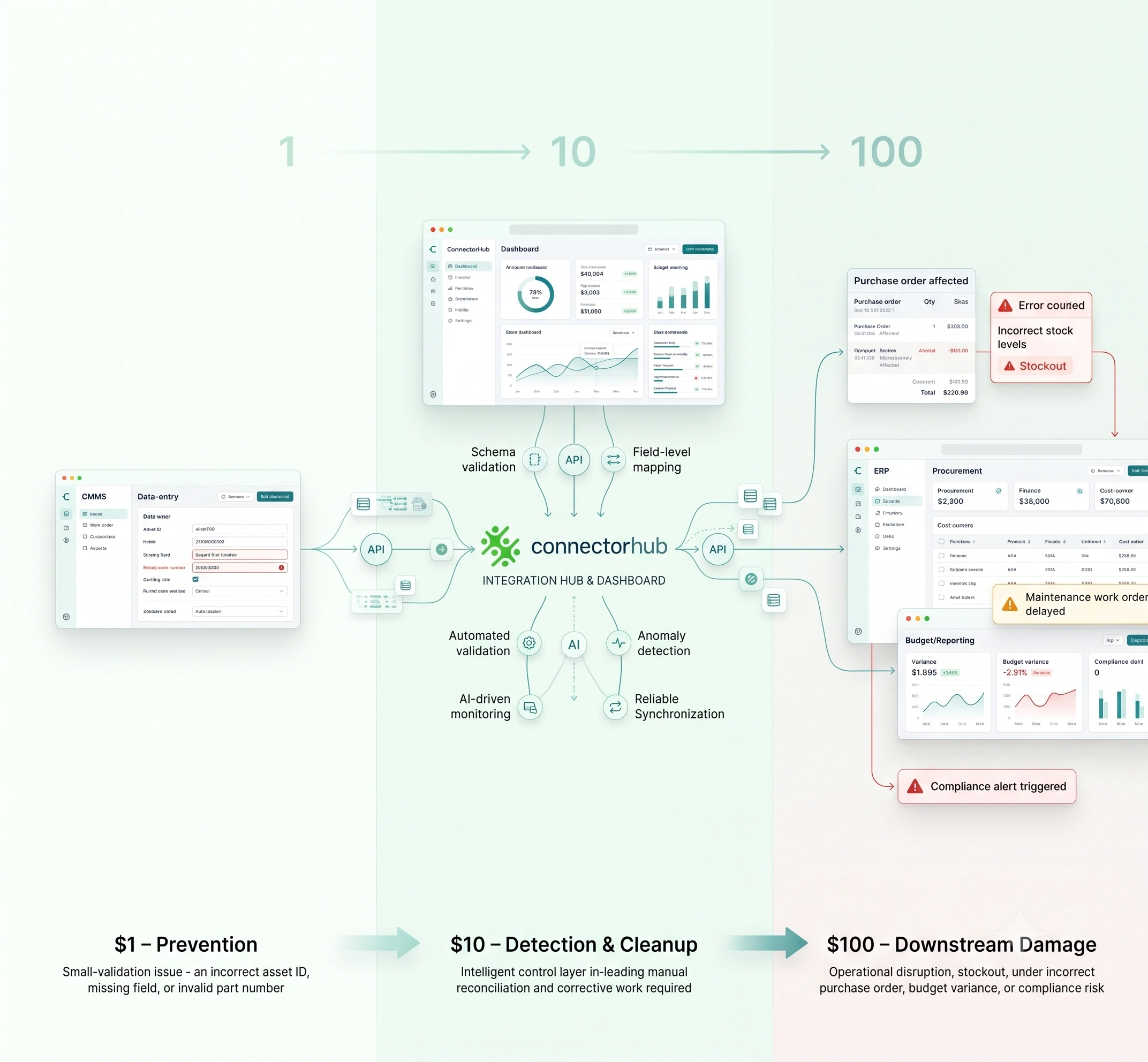
A company buys world-class software to solve specific departmental problems, for instance, a top-tier CRM for marketing, an accounting suite for finance, and a field service tool for operations. In theory, it sounds like the perfect digital transformation. But when these tools fail to work in harmony, reality hits: companies waste their most capable people on low-value work, forcing them to download unwieldy spreadsheets, clean corrupted data, and manually transfer information between disconnected systems.
It’s incredibly frustrating. More importantly, it is a massive, hidden drain on your talent and your revenue.
Finding the right iPaaS platform or a more agile iPaaS alternative is the only lasting way to break that cycle. Real workflow automation was never just about eliminating a few extra clicks or avoiding a duplicated entry. It’s about leveraging API orchestration to build a trustworthy, invisible digital nervous system across your entire business so that critical data moves exactly where it needs to go, the absolute second it is created.
Let’s dive deep into the ecosystem and walk through the ten workflow automation tools that businesses should be seriously evaluating in 2026, tools built to eliminate busywork, break down data silos, and create the operational foundation needed to scale with confidence.
Why Workflow Automation Is Absolutely Non-Negotiable in 2026?
Not too long ago, we spoke with a facility management executive who was bleeding thousands of dollars a week to what she accurately called "ghost work."
Her mobile specialists were traveling between various locations, performing their essential duties with absolute excellence, and finalizing service entries within their digital tool. However, since that remote interface lacked a smooth link into their corporate accounting system, the administrative staff remained uninformed. They needed to personally validate each individual record, reconcile details against the mobile entries, and re-enter the figures before they could manage issuing a billing statement to the customer.
The result? A staggering two-week delay in cash flow and a massive rate of human error that led to disputed invoices and frustrated customers. This is the brutal reality of disconnected systems.
In previous years, when money was cheap and margins were wider, businesses just threw more headcounts at broken processes. Today, that approach is a one-way ticket to margin compression.
Enterprise integration automation is now a modern necessity to stay competitive and relevant. When you automate the process, your software tools grow, and the slog of manually syncing data between apps wastes energy that belongs to strategy, clients, and scaling. This shift removes that weight, makes your reporting more solid, and merges messy applications into a unified engine.
The truth is, if your competition is using automation to handle sales and customer onboarding, and you are doing things manually, there is no way that you can compete on efficiency or price.
Trends Defining the Next Era of Automation
From our vantage point building these systems every day, we are seeing API integration technology mature in ways that protect your bottom line.
A few years ago, setting up a data sync meant begging your engineering team to write rigid, custom scripts. If a third-party application updated their API or modified even a single element of code, the entire integration would fail, leaving data stranded until technical resources could address the problem. The market has since shifted toward resilient, intelligent routing.
Historically, workflow automation was very rigid. It required pristine data to function. Modern platforms are now embedding large language models to provide AI-powered operational insights and process unstructured data in real time. A system can interpret an unformatted supplier's email, extract the relevant invoice number and total, and map that information directly into a database, without any human involvement.
Organizations are increasingly moving away from lightweight tools when it comes to their most sensitive business data, and for sound reasons. We are seeing a massive push for platforms that offer secure, localized integrations with strict, immutable audit logs. Companies have realized that workflow convenience is fantastic, but it absolutely cannot come at the expense of a data leak or a compliance violation.
The 10 Best Workflow Automation Tools for 2026
By 2026, the workflow automation space has truly grown up. What was once a choice between a few basic system connection tools has blossomed into a lively world of tailored iPaaS platforms, each shining in unique situations ranging from simple task automation to huge, essential business coordination.
Here are the 10 leading workflow automation tools for 2026 that you might want to consider to stay ahead:
1. ConnectorHub
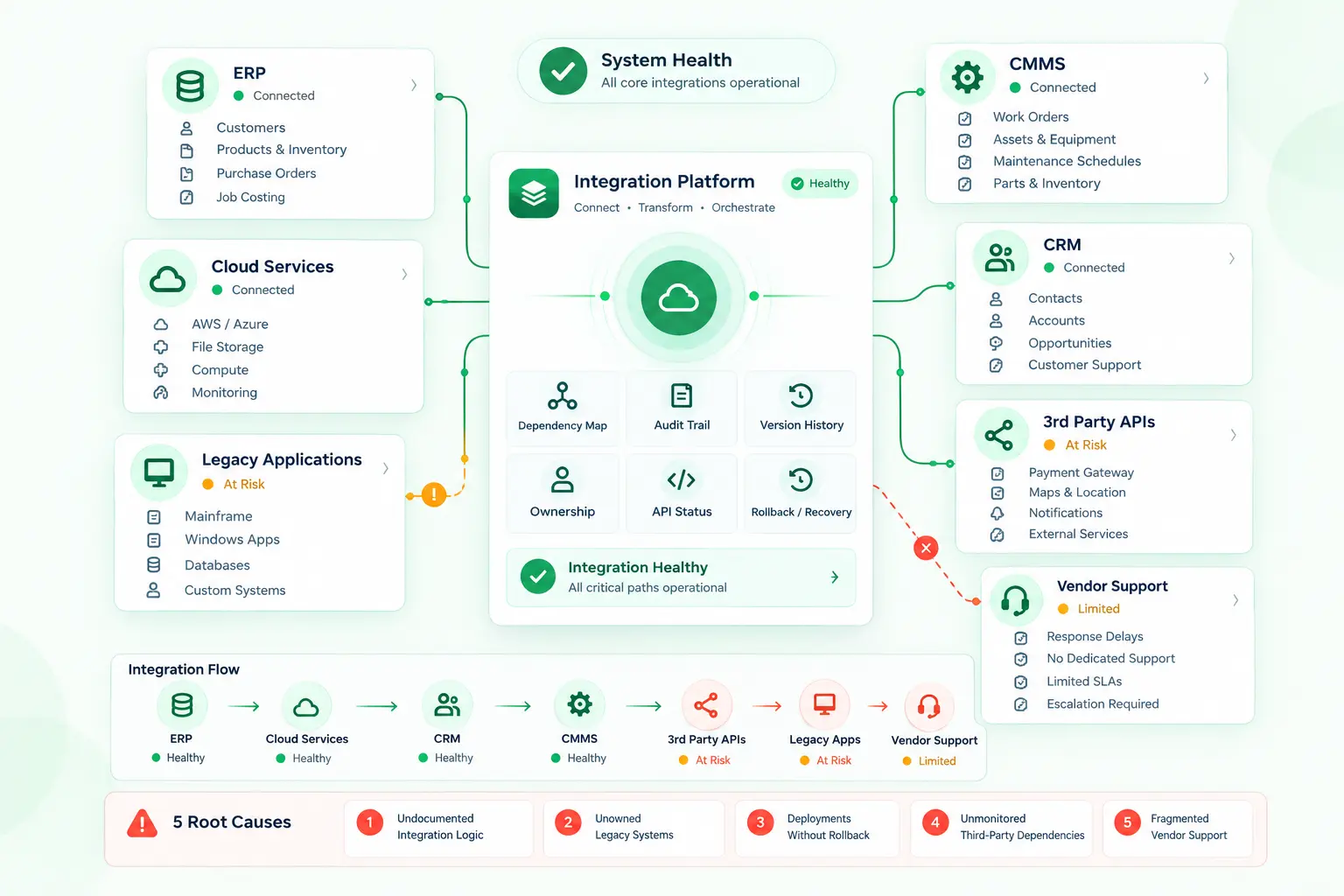
ConnectorHub is an enterprise-grade, no-code integration builder that quickly, reliably, and accurately connects complex business systems and automates mission-critical workflows. It’s made for businesses that rely on equipment/systems, field workforce, and/or time-sensitive processes: build your ERP, CMMS, CRM, HR, Finance, IoT, or industry solution stack on ConnectorHub’s reliable backbone.
With a rich library of pre-built system connectors, ConnectorHub lets you effortlessly sync data in real-time between SAP, Salesforce, NetSuite, Oracle Applications, Workday, ServiceNow, Nuvolo, CorrigoPro, and hundreds of other systems. Teams enjoy an intuitive, user-friendly experience, while administrators retain full control through automated error resolution, real-time monitoring, proactive alerts, and enterprise-grade governance.
Whether you are orchestrating work orders, managing assets, streamlining invoicing, or coordinating field teams, ConnectorHub help you kill data silos and unlock the power of your existing applications by layering connectivity.
2. Zapier
Zapier would be an ideal starting place for organizations that wish to integrate ordinary applications and improve their workflow efficiency. It performs excellently in tasks such as capturing form submissions into CRM systems, sending instant notifications through Slack, and transferring information among preferred applications like Google Workspace and Microsoft 365.
The more complex your workflows become with branching capabilities, extensive data exchanges, and multiple conditions required for validation within the same process, the less effective Zapier will prove to be.
3. Make (formerly Integromat)
Make provides an accessible digital map intended to show how information travels and connects across software. This tool helps users to manually adjust simple content arrangements, such as dividing a specific record or directing it toward various groups.
That said, the platform has a notable learning curve, particularly for users without prior experience in automation or visual programming. As scenarios grow in size and complexity, management can become more challenging. These positions make as a capable option for teams seeking greater flexibility and control in their automations.
4. n8n
n8n is an open-source automation tool perfectly built for development teams and tech lovers who enjoy running their own setups. It offers a welcoming workspace where you can simply drag-and-drop pieces into place, while easily mixing in custom JavaScript or Python code.
Among its many strengths are the number of native integrations it offers (over 400 plus HTTP requests allowing access to pretty much all APIs available online) as well as features for developing AI-powered agents, transformations, error management, and version control using Git.
Nevertheless, for the true value of self-hosting to be fully harnessed, organizations will need continuous effort and resources from within to maintain, update, and scale the application.
5. Workato
Workato operates as an intricate connective framework designed entirely for expansive corporate technology divisions overseeing enterprise automation and traditional company-wide installations, including extensive fiscal processing or international personnel assimilation.
Because it serves established historical infrastructures, adopting Workato necessitates a highly specialized technological workforce, distinct programming education, and a tremendous monetary commitment merely to establish operations correctly, rendering it to be significantly resource-intensive for responsive administrative groups that must adjust swiftly toward emerging commercial necessities.
6. Mulesoft
MuleSoft (Anypoint Platform) is a iPaaS solution for integrating legacy systems, on-premise infrastructure, cloud applications, and other data sources used in enterprises. The platform employs the API-led connectivity strategy allowing you to develop reusable APIs that can be arranged into three layers: system, process, and experience layer.
Given its capabilities for integrating mission-critical systems, compliance requirements, and digital transformation projects, along with the ability to integrate within hybrid and multicloud environments, DataWeave functionality, numerous connectors, and powerful security features, MuleSoft may prove valuable for such enterprises where integration is critical and must meet strict standards.
MuleSoft entails implementing a proper and lengthy installation process, consuming more time and resources than some automation solutions do.
7. Boomi
Boomi is a web-based system that facilitates business operations in connecting their software, data, and servers irrespective of the location where they are hosted. It offers a graphical interface along with pre-built connections that help update information, maintain technical relationships, handle intricate collaborations, and automate repetitive tasks.
This tool excels at helping older technology work with modern software, translating intricate information, and running massive operations like central resource planning and global product delivery networks.
Its pricing and capabilities are primarily oriented toward organizations with moderate to high integration volume and complexity, which may make it heavier than needed for very simple or low-volume automation requirements.
8. Celigo
Celigo is an integration platform that provides teams with an easy way to link their apps and transfer data. You can create flows that run when events happen, or on a schedule as a batch. The platform is easy to use with visual drag-and-drop integration design and comes with a wide range of pre-built integration applications and templates, plus strong links to online stores (like Shopify), CRM, and financial tools.
But if your workflows become very complex, for example if you require exceedingly customized setup, blazingly fast response times, or complicated data transformations, Celigo may not be sufficient on its own. You will likely need to integrate other tools or turn to solutions tailored for specific advanced needs.
9. Pipedream
Pipedream is an automation workflow software designed for developers that provides a visual interface as well as coding options. Pipedream integrates with apps and enables you to write Node.js, Python, or Go code directly within your workflows, along with triggers, webhooks, databases, and serverless execution.
There is significant coding involved in advanced scenarios that teams without a programming background might find this platform more difficult to grasp than simple no-code solutions. It is typically preferred by developers and tech-savvy users who value customization.
10. Tray.ai
Tray.ai is a powerhouse automation platform crafted for designing intricate, multi-step processes, especially beloved by Marketing, Sales, and RevOps groups.
Yet, businesses handling vital physical assets or wanting to drive cross-platform workflow automation using deep two-way ERP links often discover it misses the mark. It normally requires some heavy learning for tricky setups and truly fits those bigger companies having the staff to tackle their demanding automation needs. Groups wanting basic task help might find lighter tools perfectly fine.
Why ConnectorHub Stands Out in this Scenario?
Most platforms focus on helping you connect systems. ConnectorHub goes a step further. It helps you design, run, and improve workflows with built-in intelligence. Let’s see how.
1. AI-Assisted Workflow Creation
Instead of starting every workflow from scratch, ConnectorHub lets you describe what you want in plain English and generates a working draft for you.
It does not replace human input. You still review and configure connectors. But it gives you a strong starting point with the right structure, nodes, and flow already in place.
In practice, this means:
- Faster first iteration of workflows
- Less time spent figuring out structure
- More consistency across teams
It is especially useful when you are dealing with repetitive integration patterns or onboarding new use cases.
2. Smarter Field Mapping
Mapping fields between systems is often one of the most tedious parts of integration work.
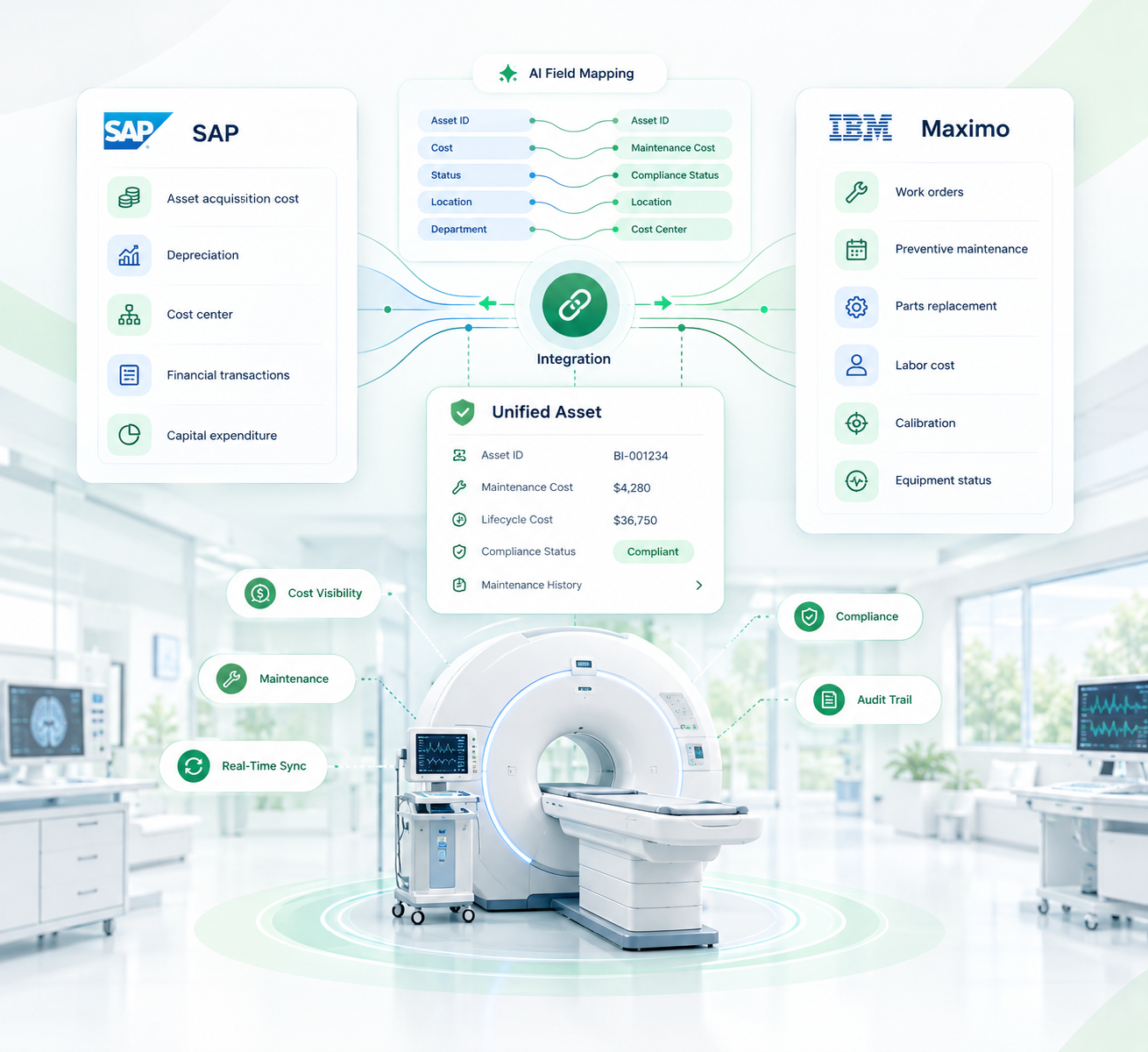
ConnectorHub’s AI-assisted field matching helps by suggesting mappings based on schema names and data types. You can accept, adjust, or ignore these suggestions. Nothing is applied automatically without review.
This strikes a useful balance:
- You save time on large schemas
- You reduce common mapping mistakes
- You still stay in control of the final data flow
For teams working with ERP, finance, or operational data, this can remove a significant chunk of manual effort.
3. A Platform That Learns From Your Workflows
As you build more workflows, ConnectorHub starts to understand how your systems and data are structured.
Behind the scenes, it indexes workflows to support:
- More relevant workflow suggestions
- Better field mapping recommendations over time
- Search based on intent, not just workflow names
This is not something you actively manage. It improves gradually as your usage grows.
4. Built for Operational Use Cases, Not Just App Syncing
ConnectorHub is purpose-built for complex operational environments where workflows are deeply intertwined with real-world physical processes
It excels in industries where business outcomes depend on tight coordination between systems, assets, people, and events in near real-time. Typical high-impact use cases include:
- In facility and asset management, ConnectorHub automates work order creation, keeps maintenance schedules in sync, and ensures asset data stays consistent across CMMS and ERP systems
- In field service operations, it connects dispatch, technician updates, job completion, and invoicing so information flows seamlessly from the field to back-office systems
- In real estate and PropTech, it streamlines tenant workflows, maintenance requests, lease processes, and integrates building data from IoT systems into core platforms
- In healthcare operations, it enables secure data movement, tracks equipment activity, supports compliance workflows, and connects clinical and administrative systems
- In energy and infrastructure, it helps monitor assets, trigger maintenance workflows, support compliance reporting, and keep field data aligned with control center systems
This is where ConnectorHub moves beyond simple integration and becomes part of how day-to-day operations actually run.
5. Built-in Reliability, Visibility, and Control
Another area where Connectorhub stands out is how it handles execution and monitoring.
Instead of treating integrations as background processes, it gives you:
- Detailed execution timelines for every workflow run
- Clear visibility into errors and failures
- Retry handling and safeguards for unstable APIs
- Audit trails for tracking what happened and when
This is important when integrations directly impact operations, such as work orders, billing, or compliance related data.
6. Faster Time to Value
Connectorhub can speed up implementation significantly because of:
- Pre built connectors and reusable patterns
- Visual workflow design
- AI assisted setup steps
At the same time, it does not hide complexity where it matters. You still have the flexibility to define logic, handle exceptions, and refine workflows properly, which is critical for production use.
It’s not just about launching integrations quickly. It’s about building reliable, adaptable automations that evolve with your business and stay easy to manage long-term. Connectorhub strives to make that possible.
Also Read: How SaaS Companies Scale Integrations Without Engineering Bottlenecks?
Conclusion
Many tools can connect apps and automate basic tasks. Connectorhub is built differently, it helps you create workflows that improve over time, with AI assisting in smart ways while keeping full control in your hands.
Still depending on manual data entry to fix system gaps is a losing approach in 2026 and beyond. This constant grind wastes your best people, delays revenue, and creates unnecessary risks. Simple tools work for simple needs, but if your operations rely on flawless work orders, complex inventory syncs, or real-time signals from field assets and machines, you need a platform designed for the real world — right now. And that’s ConnectorHub.