.svg)

Every large company has its silent tax. It hides in the pauses between systems, in the clicks that bridge one screen to another, like walking through mud, where each step forward demands unnecessary effort. Employees spend hours copying customer data, order numbers, or claim details from one tool to the next because the systems that should connect still operate in isolation. This quiet friction is known as the swivel chair problem.
It looks harmless from a distance. After all, each individual action takes only seconds. But when repeated thousands of times a day across customer service, finance, operations, and IT, those seconds become lost hours, lost accuracy, and lost energy. It drains productivity, hides operational debt, and leaves skilled employees doing the work software should have solved a decade ago.
Where the Swivel Chair Problem Came From
The term draws on that physical image of switching between screens or workstations to complete a single task, a workaround born from disconnected technology stacks.
The swivel chair problem grew out of progress itself. Enterprises kept layering tools to fix specific tasks, but those tools rarely spoke to one another. One platform handled orders. Another managed inventory. A third handled billing or ticketing.
Integration came later, usually through brittle connectors or spreadsheets. Systems could not talk directly, and employees became the “glue” transferring data manually between applications, acting as human middleware.
This pattern still survives because most organizations invested in data integration but not workflow integration. The APIs exist, but they stop short of unifying the entire process. Information moves, but work does not. The outcome is a culture of copying and pasting where speed and accuracy both erode.
The Real Cost of Manual Relay Work
Every copy-paste interaction sounds small until measured at scale. In a 500-agent contact center, even thirty seconds of extra data entry per ticket equals hundreds of hours a week. Across a year, that becomes the equivalent of multiple full-time salaries lost to clerical repetition.
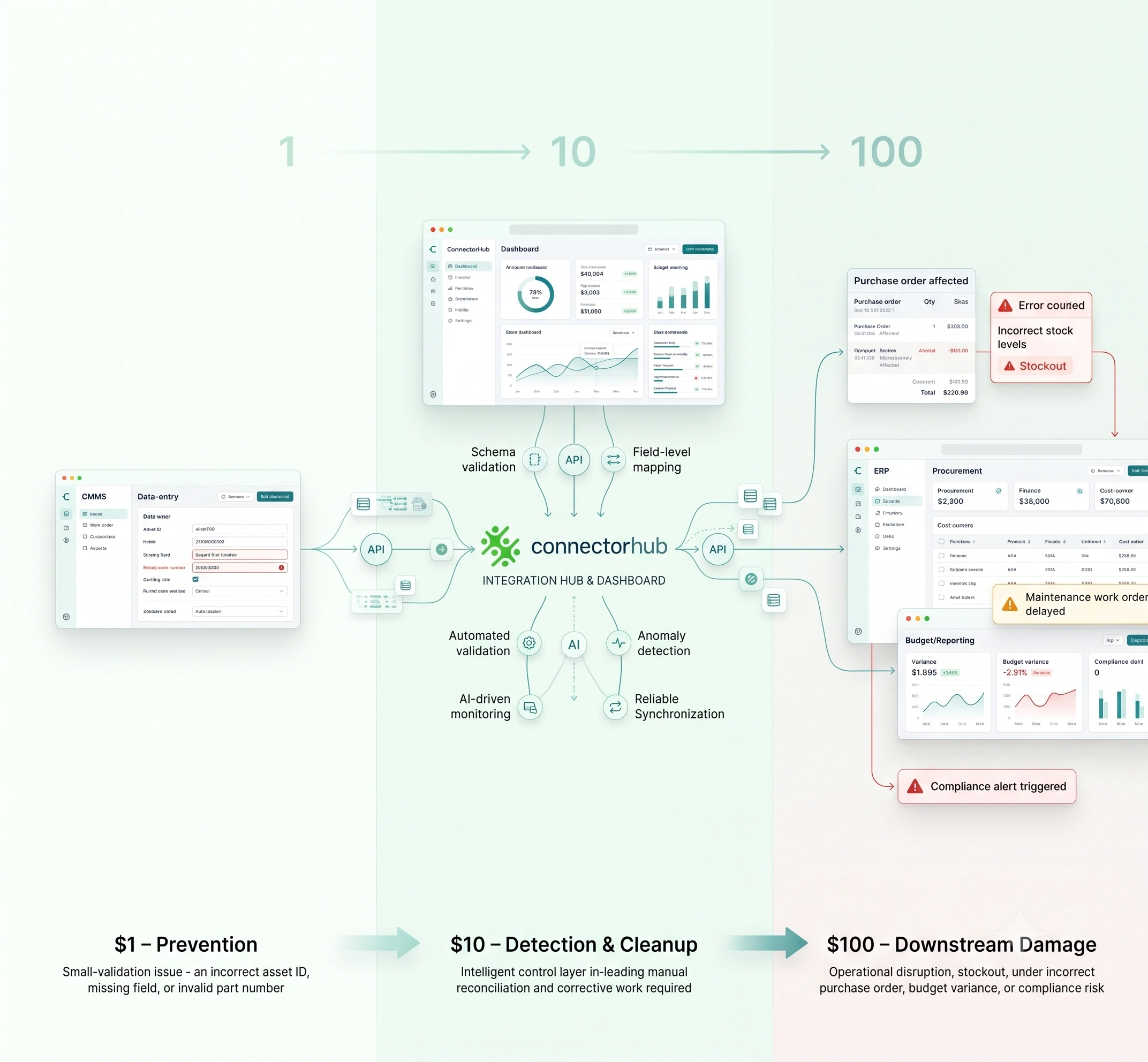
Lost minutes are easy to count, but the damage runs deeper. Every time a person becomes the link between disjointed tools, errors creep in. One wrong number, one copied field out of place, and the chain reaction reaches invoices, audits, and SLAs before anyone notices.
The third cost is human. Teams burn out doing mechanical work that brings no satisfaction. The effort feels invisible and thankless. Morale drops while turnover rises.
These three costs, time, accuracy, and morale, combine into a drag that slows every process inside an enterprise.
Metrics to Understand the Impact of Context Switching
Beyond these immediate effects, the swivel chair problem creates far-reaching consequences, such as the following.
- Quantitative Insights and Broader Economic Impact
The employees spend around 30% of the working day in searching for information and performing manual data entry between systems. Poor data quality often aggravated by these manual processes costs organizations an average of $12.9 million annually.
Moreover, employees spend 19% of their time searching for and collecting information, which could be channeled into strategic efforts. On a national scale, poor data costs the U.S. economy an estimated $3.1 trillion annually, much of it traceable to human error in manual entry.
Manual processes cost 4.8 times more than AI-automated alternatives when factoring in errors, rework, and opportunity costs, with organizations losing an average of $2.3 million annually in hidden productivity costs per 100 employees.
- Cognitive and Psychological Toll
Continual context switching, such as switching applications and tasks, gives the mind a workload comparable to that of a computer operating with limited RAM when multiple applications run simultaneously. It negatively affects productivity, decreasing it by as much as 40% and hinders effective thinking. It costs the business the loss of as many as five weeks per year.
Each switch can cost as much as 20% of cognitive function, causing errors to increase, and creativity and mental alertness to decrease. It takes the average person 23 minutes to refocus after an interruption; hence, a switch can amount to hours of lost momentum each day.
Over a period of time, these situations result in high levels of stress, which can range between 26% higher in the interrupted environment compared to their continuous counterparts
Where the Problem Hits Hardest
Some departments live in swivel mode every day.
Customer operations are the most affected by this issue. The customer service agents alternate between using CRM software and ticket systems. The same customer number has to be entered thrice before the request can be concluded. This not only slows down the response processes but further deteriorates the customers’ trust during the silent pause in calls, as the customers feel they are less valued.
Healthcare revenue cycle teams face a similar pain. Your staff must re-enter claim details between EHR systems and payer portals. Each click is a potential delay or rejection, with compliance risks amplified by error-prone manual entry.
Information technology and network teams constantly switch between monitoring dashboards, issue queues, and change history. Alert data is manually rekeyed or exported. This takes time during an outage and poses risks of cyber threats if data is not handled effectively.
The order fulfillment teams for e-commerce transactions process orders that flow through warehouse, logistics, and marketplace systems. A single mismatched entry can cause an entire order to be delayed or for the wrong product to be sent to the wrong address.
The swivel chair problem does not belong to one industry. It is now everywhere.
The Turning Point: From Manual to Automated Flow
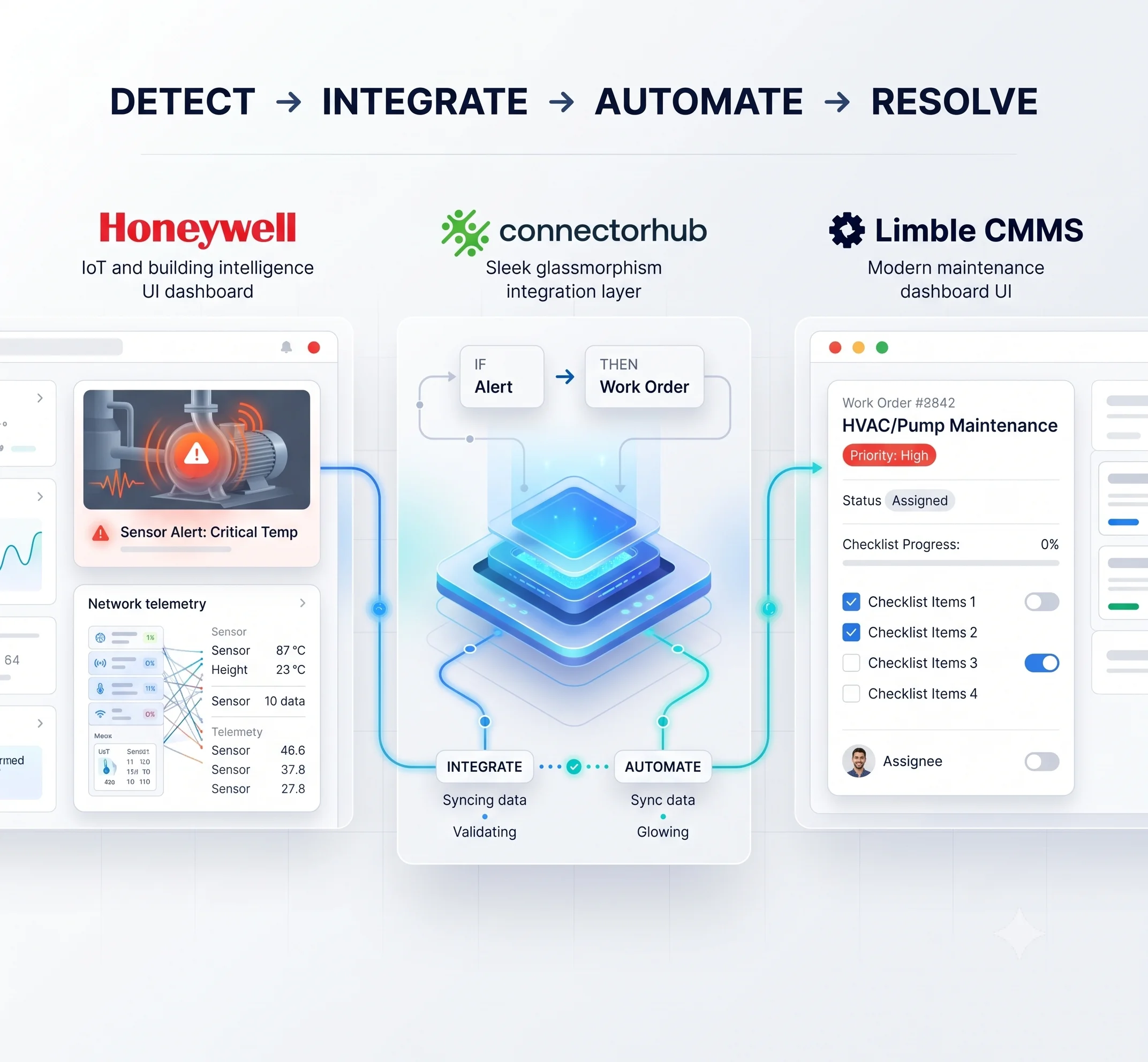
The opposite of swivel work is flow. Data moves automatically between systems while humans handle exceptions. Modern enterprises reach this state through low code workflow automation and automated workflow management.
Low-code workflow automation makes process design accessible to the team with no heavy coding. Business users can draw a flow that connects forms, approvals, APIs, and notifications, then deploy across departments and replace dozens of manual steps with one automated path.
With automated workflow management, every process becomes visible. It records how work moves, flags the hold-ups, and exposes steps that still need manual input. Hidden effort turns into numbers you can track.
For automation to hold up, it needs something solid underneath. That’s what the middleware integration platform does. It links legacy tools with cloud and API systems so workflows run smoothly instead of breaking apart.
ConnectorHub combines low code workflow automation with middleware integration platform capabilities. It connects legacy tools with cloud applications through event-based triggers and data mapping, reducing the need for custom scripts or human relay steps.
Why Low Code Workflow Automation Changes the Equation
Old automation projects needed full-time developers and dragged on for months, leaving teams stuck doing the same repetitive work while waiting for help to arrive.
Low-code workflow automation compresses that timeline. Operations teams can model a process, connect the necessary systems, and test it live within days. Each of these processes eliminates hours of work that would have had to be manually entered by using a reliable automated path.
Businesses employ it for integrating data entry in CRMs and ERPs, ticketing with change management software, or simply routing orders from warehouse software. The effect multiplies fast.
As automation expands, the swivel chair problem begins to fade. People no longer hop between monitors. Errors decrease. Processing speeds up. Key performance indicators like average handling time, first pass yield, and rework rate all begin to improve.
The Architecture That Ends Swivel Work
Behind every smooth workflow is a clean architecture. Successful automation programs share certain building blocks:
- Unified Work Surface – This one is a single interface for employees so they no longer manage ten browser tabs.
- Workflow Engine – A logic layer that decides what happens next based on triggers and conditions.
- Middleware Integration Platform – The bridge that carries data between different systems reliably.
- Monitoring and Telemetry – Equipment used for capturing transaction time data, failure frequency rate, and cycle counts for rework.
- AI Layer – A smart interface layer that facilitates predictive analytics, auto-corrections, and adaptation in decision-making based on an ever-changing business environment
This structure removes the need for human handoffs. Information moves through defined paths. The middleware integration platform anchors the system, handling the translation between APIs, databases, and legacy applications.
ConnectorHub’s Role in Modern Workflow Automation
ConnectorHub operates in the middle tier between systems, giving enterprises a unified environment for process automation. Its low code workflow automation builder allows business analysts to design cross-application workflows visually.
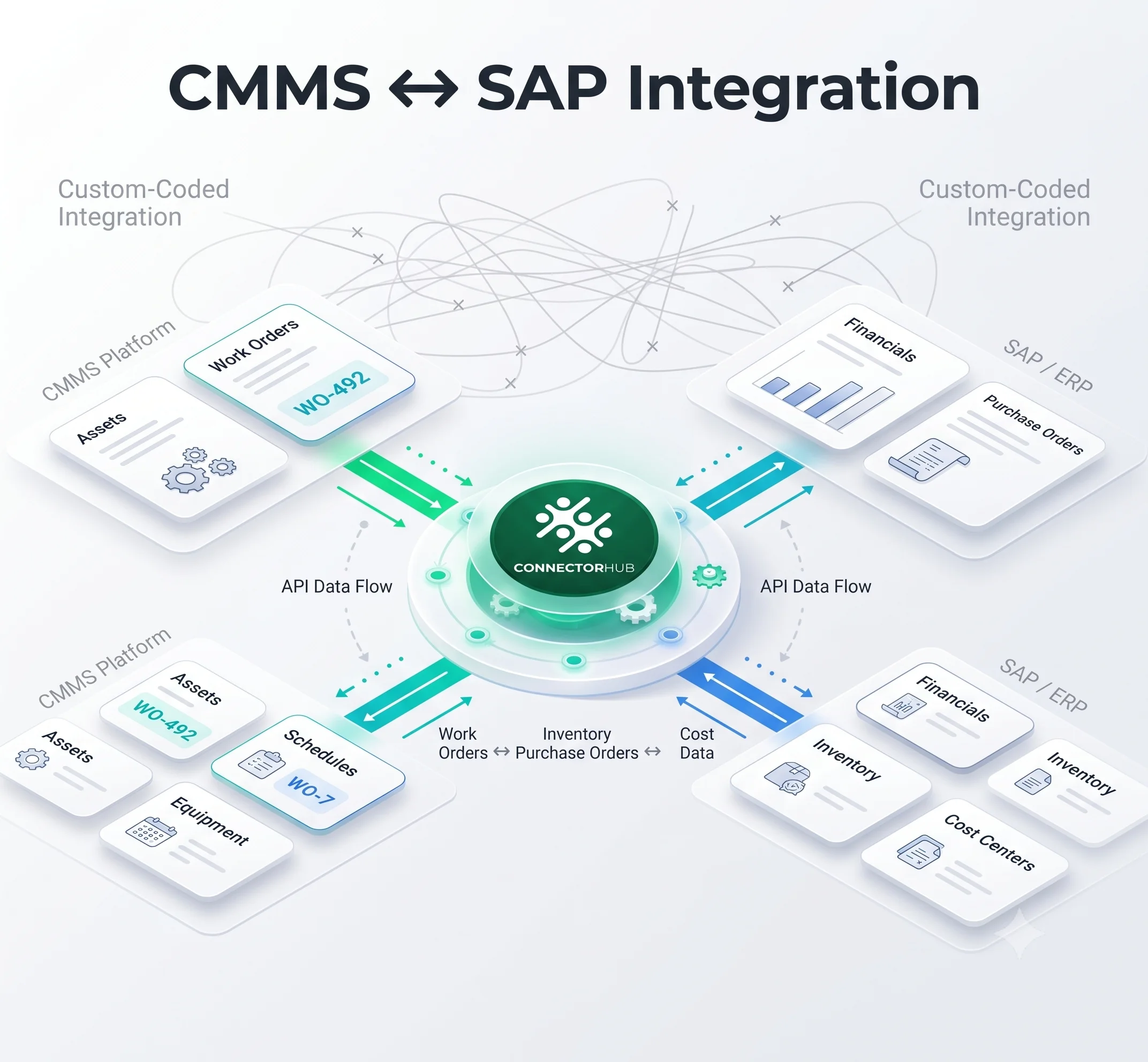
It functions as both workflow engine and middleware integration platform. That dual design removes the typical friction between front-end automation and back-end connectivity. Teams can automate CRM-to-ERP handoffs, connect ticketing to monitoring tools, or synchronize financial data without switching screens. By tying in AI for smarter triggers and data mapping, ConnectorHub enhances real-time flow, preventing "hallucinations" in automated decisions and enabling proactive operations.
Through process orchestration and integration, ConnectorHub reduces many of the manual activities that trigger swivel chair problem patterns to emerge. ConnectorHub also brings real-time data movement to teams that relied upon spreadsheets and manual reconciliation activities.
Outcome: The Human Shift in Productivity with Automation
When the swivel chair problem goes away, the daily rhythm of work changes dramatically. Employees spend much less time juggling disparate interfaces and much more time tackling the customer problems, creative solutions, and strategic decisions that truly count for the business.
This means instant and tangible relief. No longer does the staff count time in endless copy-paste cycles or repetitive data handling. Instead, the staff is concerned with outcomes, delivery of value, innovation, and building stronger relationships. Morale dramatically improves since work once again starts to feel purposeful and meaningful. The teams' confidence grows since the systems actually started serving them instead of slowing them down with friction and delays. People love working for a company when they feel enabled by technology, not enslaved by it.
Building a Unified, Automated System to Overcome Swivel Chair Bottlenecks
Moving out of the swivel chair problem mindset and into a completely integrated automated system takes a disciplined, cyclical process that disrupts less and benefits more.
- Start with a rigorous current state analysis, sometimes referred to as process discovery or process mapping. Then, inventory all points where staff must manually transfer information from one system to another-documenting workflows, involved tools, the frequency of switches, and time utilized in each switch. Employee interviews, workflow audits, shadowing, or process intelligence tools can help quantify the "swivel moments" and identify bottlenecks. This step uncovers hidden inefficiencies and forms a baseline against which to measure future success.
- Second, focus on high-value operations that result in quick ROI by prioritizing the biggest drain of operations for fast ROI returns. Here, pinpoint repetitive and rule-based operations with lots of manual data input and transfer as these often result in quick returns and gaining speed and momentum here can pay for other projects at a later date by generating ROI that can be re-invested elsewhere.
- Implement low-code automation for workflows by creating clean, event-driven workflows that remove typing tasks. Business analysts or citizen developers have the ability to map workflows from forms, APIs, approval tasks, and notifications without extensive coding work involved. Create workflows in automation that trigger when events (such as ticket creation or updates of data) happen in place of many other tasks performed by human effort.
- Integrate everything via a strong middleware integration platform that assures data alignment and reliability across legacy, cloud, and on-premise systems. Utilize APIs, connectors, or event-based triggers to enable bidirectional data flow, minimizing brittleness and eliminating the human middleware. Select platforms that natively support data mapping, transformation, error handling, and real-time synchronization to avoid inconsistencies of any sort.
- Establish continuous monitoring and optimization via automated workflow management solutions. Monitor metrics such as transaction time, failure rates, rework cycles, as well as manual touches for each process flow. Optimize with telemetry features built within solutions for alerting delays, highlighting additional manual steps within the process flow, and reacting to data-driven insights for improvement. Promote the attitude of continuous improvement, with workflows evaluated for performance indicators and employee feedback.
Best Practices to Secure Adoption & Long-term Success
Through understanding the very best practices that have worked effectively in previous enterprise implementations, organizations have the ability to holistically identify areas of waste, select the most valuable opportunities, create robust automation, and achieve sustainability.
- Set clear, measurable objectives like AHT reduction by 30 to 50%, improvement of First Call Resolution (FCR), lowering errors below 1%, and manual touches by 70 to 90%. Link these with business outcomes like quick SLAs, cost savings, and increased employee satisfaction.
- Assess vendors thoughtfully—look for platforms that have good security measures (such as encryption and compliance certification), good integration capabilities, usability for those who are not technical, and good AI governance capabilities for future-proofing.
- Involve employees early and often. This can be achieved through training and feedback. Show employees that instead of replacing them, automation is a form of empowerment. This would give employees hands-on experience with the new processes. This would give them a sense of ownership.
- Roll out in phases—a pilot in one department or process area to learn from it and then for the entire enterprise. This will ensure lower risk and quicker iterations and prove value to the customers.
- Maintain governance and balance—implement rules relating to human-in-the-loop interventions (for example, pausing a workflow to review it in case of exceptions).
By embedding these practices, organizations create a foundation for scalable, adaptive automation with a consolidated system where data flows effortlessly, errors plummet, productivity surges, and teams become high-value contributors, resulting in a competitive advantage in any sector.
Also Read: How to Spot the Swivel Chair Problem in Your Operations Before It Gets Expensive
Conclusion
What we need to look forward to is a future without swivel chairs.
Every hour spent copying data is an hour stolen from better thinking. Every manual update is a chance for human error. Automation fixes both at once.
The shift away from manual relay work is not about chasing trends. It is about freeing time, restoring accuracy, and giving teams a sense of progress. Every hour spent copying data is an hour stolen from better thinking. Every manual update is a chance for human error. Automation fixes both at once.
Low code workflow automation, automated workflow management, and middleware integration platforms form the trio that ends the swivel chair problem. They reconnect systems that should have never drifted apart. With trends like fully agentic workflows on the horizon thanks to AI, organizations can look forward to even more efficiencies being unlocked as platforms continue to improve and support decisions that would previously have needed human intervention and insight.
ConnectorHub and other similar platforms are reshaping enterprise operations quietly but profoundly. They make data move on its own, turn screens into unified work surfaces, and return decision-making power to people instead of processes.
The swivel chair problem once symbolized how enterprise software failed to serve its users. Now it marks the starting point of recovery. Each automated flow replaces a loop of wasted motion. Each integration gives time back to the business.
And as the swivel chairs stop turning, operations begin to breathe again.